Testing in Practice · Part 17
Property-based testing with Hypothesis (hands-on): seven examples passed, three bugs found, and one property that lied
ProvaLab team · · 9 min read
Every test you've written so far in this series checks examples: this input, that expected output. Examples are clear and easy to read. Their weakness is that you choose them, and you choose the cases you thought of. The bugs live in the cases you didn't.
Property-based testing turns that around. You describe what must be true for every input, a property, and a tool generates hundreds of inputs to try to break it. When it finds one, it shrinks it to the smallest input that still fails, so you get "1 paisa between 2 people" instead of "₹8,471,293.17 between 37 people".
The best-known tool for Python is Hypothesis. This post uses it on FoodNow's money code: discounts, splitting a group order's bill, and showing prices in Indian format. The code has three bugs, and seven example tests that all pass. Every result below is from a real run, with Hypothesis 6.170.15.
The code
foodnow/money.py. All amounts are in paise (₹1 = 100 paise):
"""FoodNow money helpers. All amounts are in paise (₹1 = 100 paise)."""


def discounted_food_total(dishes: int, price: int) -> int:
    """Orders of 10 or more dishes get 10% off."""
    food = dishes * price
    if dishes > 10:
        food = food * 90 // 100
    return food


def split_bill(total: int, people: int) -> list[int]:
    """Split a group order's total between colleagues."""
    share = round(total / people)
    return [share] * people


def format_inr(paise: int) -> str:
    """₹1,25,000.50 - Indian digit grouping: the last three digits, then pairs."""
    rupees, p = divmod(paise, 100)
    digits = str(rupees)
    head, tail = digits[:-3], digits[-3:]
    groups = []
    while len(head) > 2:
        groups.insert(0, head[-2:])
        head = head[:-2]
    if head:
        groups.insert(0, head)
    whole = ",".join(groups + [tail])
    return f"₹{whole}.{p}" if p else f"₹{whole}"


def parse_inr(text: str) -> int:
    whole, _, frac = text.removeprefix("₹").replace(",", "").partition(".")
    return int(whole) * 100 + (int(frac) if frac else 0)
split_bill is for group ordering, the feature that Part 14 found had no tests. format_inr uses the Indian digit grouping from Part 15.
Step 1: The example tests
These are the tests the team already had, in tests/test_examples.py:
"""The example-based tests the team already had. All of them pass."""
from foodnow.money import discounted_food_total, format_inr, parse_inr, split_bill


def test_small_order_no_discount():
    assert discounted_food_total(2, 18000) == 36000


def test_big_order_discount():
    assert discounted_food_total(12, 18000) == 194400


def test_split_evenly():
    assert split_bill(90000, 3) == [30000, 30000, 30000]


def test_split_between_two():
    assert split_bill(41000, 2) == [20500, 20500]


def test_format_lakh():
    assert format_inr(12500000) == "₹1,25,000"


def test_format_with_paise():
    assert format_inr(12500050) == "₹1,25,000.50"


def test_parse():
    assert parse_inr("₹1,25,000.50") == 12500050
pip install pytest==9.2.0 hypothesis==6.170.15
$ pytest tests/test_examples.py -q
.......                                                                  [100%]
7 passed in 0.65s
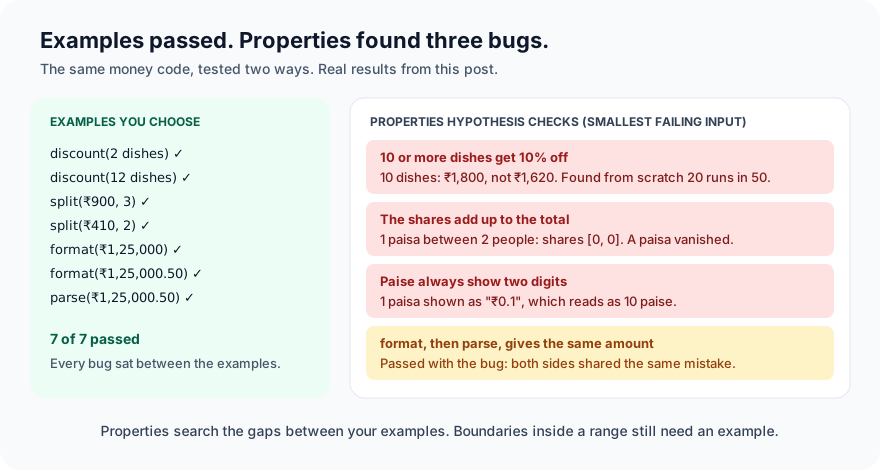
Seven reasonable examples, all green, three bugs.
Step 2: Write properties
A property says what's always true. For money code, good properties come from the rules and from common sense:
- 10 or more dishes get 10% off; fewer don't.
- When you split a bill, the shares add up to the total. No paisa appears or disappears.
- The split is fair: nobody pays more than one paisa more than anyone else.
- If you format an amount and parse the text back, you get the same amount.
tests/test_properties.py:
"""Properties: things that must be true for every input, not just the examples we thought of."""
from hypothesis import given, strategies as st

from foodnow.money import discounted_food_total, format_inr, parse_inr, split_bill

paise = st.integers(min_value=0, max_value=10**10)          # up to ₹10 crore
people = st.integers(min_value=1, max_value=50)


@given(dishes=st.integers(min_value=1, max_value=100), price=st.integers(min_value=100, max_value=100_000))
def test_ten_or_more_dishes_get_ten_percent_off(dishes, price):
    expected = dishes * price * 90 // 100 if dishes >= 10 else dishes * price
    assert discounted_food_total(dishes, price) == expected


@given(total=paise, n=people)
def test_split_adds_up_to_the_total(total, n):
    assert sum(split_bill(total, n)) == total


@given(total=paise, n=people)
def test_split_is_fair(total, n):
    shares = split_bill(total, n)
    assert len(shares) == n
    assert max(shares) - min(shares) <= 1  # nobody pays more than one paisa extra


@given(amount=paise)
def test_format_then_parse_gives_the_same_amount(amount):
    assert parse_inr(format_inr(amount)) == amount
@given tells Hypothesis to call the test many times (100 by default), each time with values drawn from the strategies: here, whole numbers in a range. Hypothesis doesn't pick them uniformly. It favours values that tend to break code: zero, the ends of the range, small numbers, and numbers it has seen cause trouble.
Step 3: Run it, and read it carefully
$ pytest tests/test_properties.py -q
E       assert 0 == 1
E        +  where 0 = sum([0, 0])
E        +    where [0, 0] = split_bill(1, 2)
E       Failing test case: test_split_adds_up_to_the_total(
E           total=1,
E           n=2,
E       )
1 failed, 3 passed in 0.36s
One real bug, shrunk beautifully: 1 paisa split between 2 people gives [0, 0]. A paisa disappears. round(0.5) is 0 in Python. With bigger numbers it's the same problem: ₹1,000 split between 3 people becomes three shares of ₹333.33, and a paisa is lost; other amounts round up and charge the group more than the bill. The example tests used amounts that divide exactly.
But look at what passed. Three bugs, and only one property failed. That needs explaining before you trust the green ones.
The fairness property passed because [share] * people is perfectly fair. Every share is the same. It's just wrong. A property can only check what it says, so you need more than one property per function: here, "adds up" and "is fair" together.
The round-trip property passed with a real bug in it. One paisa is formatted as ₹0.1, which anyone would read as 10 paise. But parse_inr("₹0.1") reads the 1 after the dot as 1 paisa, so the round trip gives back the right number. Formatting and parsing share the same mistake, so the round trip can't see it. Round-trip properties are excellent at finding asymmetry between two functions, and blind when both are wrong in the same way.
The discount property passed even though 10 dishes don't get the discount. Hypothesis tries the ends of the range (1 and 100) and many values in between, but 10 is just one value in the middle, and the second input, the price, spreads its effort further. We measured it: 50 runs, each from scratch, with these strategies. Hypothesis found the bug in 20 of the 50. With a narrower range and a fixed price, 1 to 50 dishes, it found it in 50 of 50. Boundaries that live inside your rules, rather than at the edges of a range, are worth stating yourself.
Step 4: Make the properties honest
Two changes. An explicit example pins the boundary, so it's checked on every run. And a property that compares the formatter with an independent, obviously correct description of the format, instead of with its own parser:
import re

from hypothesis import example, given, strategies as st


@given(dishes=st.integers(min_value=1, max_value=100), price=st.integers(min_value=100, max_value=100_000))
@example(dishes=9, price=18000)
@example(dishes=10, price=18000)  # the boundary in the rule: always check it
def test_ten_or_more_dishes_get_ten_percent_off(dishes, price):
    expected = dishes * price * 90 // 100 if dishes >= 10 else dishes * price
    assert discounted_food_total(dishes, price) == expected


@given(amount=paise)
def test_format_shows_two_digit_paise_and_indian_grouping(amount):
    text = format_inr(amount)
    rupees, p = divmod(amount, 100)
    assert text.replace(",", "") == f"₹{rupees}" + (f".{p:02d}" if p else "")
    assert re.fullmatch(r"₹(\d{1,2},)?(\d{2},)*\d{1,3}(\.\d{2})?", text), text
The new formatting property says two things: without the commas, the text is the rupees and two-digit paise. And the commas follow the Indian pattern: a group of three at the end, then pairs.
One more change, in tests/conftest.py:
from hypothesis import settings

# Don't replay saved failures from earlier runs, so every run shows what Hypothesis finds from scratch.
settings.register_profile("fresh", database=None)
settings.load_profile("fresh")
Normally Hypothesis saves every failing input in a .hypothesis folder and tries it first on the next run. That's a feature: a bug it found once is checked every time after that, until it's fixed. But it also means "it found the bug again" may only mean "it remembered". For this post we turned it off, so each run starts from nothing. In your own project, keep the database. Commit it, or share it in CI, so everyone benefits from what Hypothesis has found.
Three runs, each from scratch:
3 failed, 2 passed in 0.24s
3 failed, 2 passed in 0.26s
3 failed, 2 passed in 0.22s
E       assert 180000 == 162000
E        +  where 180000 = discounted_food_total(10, 18000)
E       Failing explicit example: test_ten_or_more_dishes_get_ten_percent_off(
E           dishes=10,
E           price=18000,
E       )

E       assert 0 == 1
E        +  where 0 = sum([0, 0])
E        +    where [0, 0] = split_bill(1, 2)
E       Failing test case: test_split_adds_up_to_the_total(
E           total=1,
E           n=2,
E       )

E       AssertionError: assert '₹0.1' == '₹0.01'
E       Failing test case: test_format_shows_two_digit_paise_and_indian_grouping(
E           amount=1,
E       )
All three bugs, every time, each shrunk to the smallest case: 10 dishes at ₹180 charged ₹1,800 instead of ₹1,620; 1 paisa split into nothing; 1 paisa shown as ₹0.1.
Step 5: Fix the code
-    if dishes > 10:
+    if dishes >= 10:
...
-    share = round(total / people)
-    return [share] * people
+    base, extra = divmod(total, people)
+    return [base + 1] * extra + [base] * (people - extra)  # the first `extra` people pay one paisa more
...
-    return f"₹{whole}.{p}" if p else f"₹{whole}"
+    return f"₹{whole}.{p:02d}" if p else f"₹{whole}"
The split now divides exactly: ₹1,000 between 3 people is ₹333.34, ₹333.33 and ₹333.33, which adds up to ₹1,000 and is fair to within a paisa.
$ pytest tests -q
............                                                             [100%]
12 passed in 0.26s
Run three times from scratch: 12 passed each time. That's 7 examples, plus 5 properties that each tried 100 inputs, in about a quarter of a second.
When to use property-based testing
| Good fit | Why |
|---|---|
| Money, rounding, units | Easy rules ("adds up", "never negative"), and bugs in rare values |
| Parsers and formatters | Round trips, plus a check against an independent description |
| Anything with "for all" in its rule | "Every order...", "no matter how many people..." |
| Code with a simple reference version | Compare a fast or clever version with a slow, obvious one |
| Sequences of actions | Hypothesis's stateful testing generates whole sequences, such as add, remove, check out |
It's a poorer fit for UI flows and for code whose correct output you can only describe by computing it the same way the code does. If the property repeats the code's logic, it shares the code's bugs.
Common mistakes
- One property per function. Our fairness property passed a split that lost money. Combine properties that check different things.
- Trusting round trips alone. Format and parse were wrong together. Add a check against an independent description.
- Assuming Hypothesis tries every boundary. It tries the ends of ranges. Boundaries inside your rules need
@example. Ours was found in only 20 runs out of 50 without it. - Mistaking replay for discovery. The
.hypothesisdatabase replays old failures. Great in daily use, but don't count it as proof that a new test finds the bug. - Repeating the code in the property.
expected = round(total / n) * nwould agree with the bug. Describe what must be true, not how to compute it. - Generating huge ranges by habit. Choose strategies close to real inputs, and add edge cases as examples.
What's next
In Part 18 of Testing in Practice we run the same FoodNow tests on three browser engines, Chromium, Firefox and WebKit (the engine behind Safari), and look at what differs between them.
ProvaLab's pytest plugin reports Hypothesis tests like any other pytest test, so a property that fails shows up in the ProvaLab test management system with its failure message, and in the test's history across runs. See it in the two-minute product tour.
See ProvaLab working on a real app
Your coding agent runs the tests, reads the failures and fixes them.