Testing in Practice · Part 15
Localization testing (hands-on): Hindi, German and Arabic, pseudo-localization, and 16 failures on one page
ProvaLab team · · 13 min read
Your app works in English. Then it's translated, and things break that nobody touched:
- The German for "Change address" doesn't fit its button.
- A price shows as ₹125,000 when an Indian reader expects ₹1,25,000.
- "11/12/2026" means 12 November to an American and 11 December to almost everyone else.
- Arabic is written right to left, and it has six plural forms.
Localization testing checks that the app works and reads correctly in each language and region it supports. It's usually split in two:
- Internationalization (i18n) testing: is the code ready for other languages? No text built into the code, formats taken from the locale, layouts that grow and flip. Developers and testers can check this, often before any translation exists.
- Linguistic testing: are the translations right, natural and appropriate? That needs native speakers.
This post is mostly about the first kind, because it can be automated. We tested a FoodNow order page in Hindi, German and Arabic with Playwright and pytest. Six kinds of bug were planted in it. The tests found them all, and one we didn't plant. Every result below is from a real run.
The translations in this post were written for this example. Before you ship translations, have native speakers review them. That's the linguistic testing a script can't do.
The page and its translations
The page shows a FoodNow order: the delivery address with a button to change it, the number of items, the delivery fee, the total, and the delivery date. The language comes from ?lang= in the address. The translations live in site/strings.js:
const STRINGS = {
  en: {
    title: "Your order", fee: "Delivery fee", total: "Total", place: "Place order", address: "Change address",
    item_one: "{n} item", item_other: "{n} items",
    deliver_on: "Delivery on {date}",
  },
  hi: {
    title: "आपका ऑर्डर", fee: "डिलीवरी शुल्क", total: "कुल", place: "ऑर्डर करें", address: "पता बदलें",
    item_one: "{n} आइटम", item_other: "{n} आइटम",
    deliver_on: "डिलीवरी {date} को",
  },
  de: {
    title: "Ihre Bestellung", fee: "Liefergebühr", total: "Gesamt", place: "Bestellung aufgeben", address: "Lieferadresse ändern",
    item_one: "{n} Artikel", item_other: "{n} Artikel",
    deliver_on: "Lieferung am {date}",
  },
  ar: {
    title: "طلبك", fee: "رسوم التوصيل", total: "المجموع", place: "تأكيد الطلب", address: "تغيير العنوان",
    item_zero: "لا توجد عناصر", item_one: "عنصر واحد", item_two: "عنصران",
    item_few: "{n} عناصر", item_many: "{n} عنصرًا", item_other: "{n} عنصر",
    deliver_on: "التوصيل في {date}",
  },
};
Arabic has six plural forms: zero, one, two, few (3–10), many (11–99) and other (for example 100). English has two. Hindi and German also have two, but Hindi counts 0 as "one" and German doesn't. The Unicode CLDR project publishes these rules for every language, and browsers include them.
The first version of the page's script, with its bugs:
const money = paise => "₹" + (paise / 100).toLocaleString("en-US");
document.getElementById("count").textContent = t(items === 1 ? "item_one" : "item_other", { n: items });
document.getElementById("total").textContent = money(totalPaise);
const when = new Date(2026, 10, 12);  // 12 November 2026
document.getElementById("when").textContent = t("deliver_on", { date: when.toLocaleDateString("en-US") });
And in the HTML:
<div class="row"><span>Delivery fee</span><span id="fee"></span></div>
.addr button { width: 130px; white-space: nowrap; overflow: hidden; }
Six bugs, all common in real apps:
- "Delivery fee" is typed into the HTML instead of coming from the translations.
- Money is always formatted the American way.
- Plurals use English's rule: one, or not one.
- The date is always American: month first.
- The page never says it's Arabic, or that Arabic runs right to left.
- The address button has a fixed width and hides anything that doesn't fit.
Step 1: Set up
mkdir foodnow-l10n && cd foodnow-l10n
python -m venv .venv && source .venv/bin/activate
pip install pytest==9.2.0 playwright==1.64.0
playwright install chromium
mkdir -p site tests shots
To see Hindi and Arabic text in screenshots, the machine needs fonts for them. We used Noto Sans Devanagari and Noto Sans Arabic. Without them, the browser draws empty boxes, and your screenshots can't show what users see.
Step 2: Pseudo-localization
You don't have to wait for translations to start testing. Pseudo-localization turns every English string into a fake language that's still readable, so problems stand out before any translator is involved:
// Pseudo-localization: accented, longer, and bracketed, so untranslated or cut-off text stands out.
const ACCENTS = { a: "å", e: "é", i: "ï", o: "ö", u: "ü", A: "Å", E: "É", I: "Ï", O: "Ö", U: "Ü", c: "ç", n: "ñ" };
function pseudo(text) {
  const accented = text.replace(/\{[^}]+\}|./g, ch => ch.startsWith("{") ? ch : (ACCENTS[ch] || ch));
  const pad = "~".repeat(Math.ceil(text.length * 0.4));
  return `[${accented}${pad}]`;
}
STRINGS["en-XA"] = Object.fromEntries(Object.entries(STRINGS.en).map(([k, v]) => [k, pseudo(v)]));
"Change address" becomes [Chåñgé åddréss~~~~~~]. Three things happen at once:
- Brackets show where each string starts and ends, so you can see text that's cut off or joined wrongly.
- Accented letters show text that can't handle characters beyond plain English.
- About 40% extra length imitates languages like German, which often run 30% longer than English, and more for short strings.
Any interface text without brackets didn't come from the translations, so it will stay in English in every language. en-XA is a code commonly used for this, including on Android, which has pseudo-locales built in.
Step 3: The tests
tests/conftest.py serves the site folder and opens a page in the right browser locale for each language:
import functools
import http.server
import threading
from pathlib import Path

import pytest
from playwright.sync_api import sync_playwright

SITE = Path(__file__).parents[1] / "site"

# The app's language code, and the browser locale a user of that language would have.
LANGS = {"en": "en-IN", "hi": "hi-IN", "de": "de-DE", "ar": "ar", "en-XA": "en-IN"}


@pytest.fixture(scope="session")
def base_url():
    handler = functools.partial(http.server.SimpleHTTPRequestHandler, directory=SITE)
    server = http.server.ThreadingHTTPServer(("127.0.0.1", 0), handler)
    threading.Thread(target=server.serve_forever, daemon=True).start()
    yield f"http://127.0.0.1:{server.server_port}"
    server.shutdown()


@pytest.fixture(scope="session")
def browser():
    with sync_playwright() as p:
        browser = p.chromium.launch()
        yield browser
        browser.close()


@pytest.fixture
def open_page(browser, base_url):
    pages = []

    def _open(lang, items=3, total=12500000, width=412):
        context = browser.new_context(locale=LANGS[lang], viewport={"width": width, "height": 800})
        page = context.new_page()
        page.goto(f"{base_url}/index.html?lang={lang}&items={items}&total={total}")
        pages.append(context)
        return page

    yield _open
    for c in pages:
        c.close()
locale= sets the browser's language and region, as a real user's phone would. The total is ₹1,25,000 (12,500,000 paise), a lunch for 400 people, big enough to show the Indian way of grouping digits.
And tests/test_l10n.py, one test for each kind of problem:
import pytest
def clean(text: str) -> str:
"""Drop invisible direction marks and turn non-breaking spaces into spaces."""
return text.replace("", "").replace("", "").replace("\xa0", " ").strip()
# 1. Pseudo-localization: every piece of interface text must come from the translations.
def test_no_hardcoded_text(open_page):
page = open_page("en-XA")
user_data = {"where"} # the customer's own address is not interface text
hardcoded = page.evaluate("""userData => [...document.querySelectorAll('main *')]
.filter(e => e.children.length === 0 && /[A-Za-z]/.test(e.textContent) && !userData.includes(e.id))
.map(e => e.textContent.trim())
.filter(t => !t.startsWith('['))""", list(user_data))
assert hardcoded == []
# 2. Text must fit: nothing cut off, in any language, including pseudo-localized text.
@pytest.mark.parametrize("lang", ["en", "hi", "de", "ar", "en-XA"])
def test_buttons_fit_their_text(open_page, lang):
page = open_page(lang)
cut = page.evaluate("""() => [...document.querySelectorAll('button')]
.filter(b => b.scrollWidth > b.clientWidth)
.map(b => `${b.textContent} (${b.scrollWidth}px of text in ${b.clientWidth}px)`)""")
if cut:
page.screenshot(path=f"shots/cut-{lang}.png")
assert cut == []
# 3. Money in each language's format.
@pytest.mark.parametrize("lang, total, fee", [
("en", "₹1,25,000", "₹40"),
("hi", "₹1,25,000", "₹40"),
("de", "125.000 ₹", "40 ₹"),
("ar", "125,000 ₹", "40 ₹"),
])
def test_money_format(open_page, lang, total, fee):
page = open_page(lang)
assert clean(page.text_content("#total")) == total
assert clean(page.text_content("#fee")) == fee
# 4. Dates nobody can misread: 12 November 2026.
@pytest.mark.parametrize("lang, expected", [
("en", "Delivery on 12 November 2026"),
("hi", "डिलीवरी 12 नवंबर 2026 को"),
("de", "Lieferung am 12. November 2026"),
("ar", "التوصيل في 12 نوفمبر 2026"),
])
def test_delivery_date(open_page, lang, expected):
assert clean(open_page(lang).text_content("#when")) == expected
# 5. Plurals: Arabic has six forms.
@pytest.mark.parametrize("n, expected", [
(1, "عنصر واحد"), (2, "عنصران"), (3, "3 عناصر"), (11, "11 عنصرًا"), (100, "100 عنصر"),
])
def test_arabic_plurals(open_page, n, expected):
assert clean(open_page("ar", items=n).text_content("#count")) == expected
# 6. Right-to-left: Arabic pages must be laid out right to left.
def test_arabic_is_right_to_left(open_page):
page = open_page("ar")
assert page.evaluate("document.documentElement.dir") == "rtl"
assert page.evaluate("document.documentElement.lang") == "ar"
# Where the heading's text actually is (its box is full width either way).
text_left = page.evaluate("""() => {
const range = document.createRange();
range.selectNodeContents(document.getElementById('title'));
return range.getBoundingClientRect().left;
}""")
assert text_left > 200, f"the heading should start on the right, but its text starts at x={text_left:.0f}"
A few details that matter:
- Where the expected formats come from. We asked Chromium's built-in
Intlformatting what each locale uses, then checked that it was right for our users before writing it into the tests. In German, the currency sign goes after the number, with a dot for thousands. Chromium writes Arabic amounts with Western digits (125,000) by default. Some Arabic-speaking regions prefer Eastern Arabic digits (١٢٥٬٠٠٠). That's a product decision, so the test records the decision you made. clean(). Formatted numbers contain invisible characters: a non-breaking space between "125.000" and "₹", and in Arabic a right-to-left mark. They're correct, but they make string comparisons fail in confusing ways. Strip them in the comparison, not in the app.- The right-to-left check measures the text, not the box. Our first version checked the heading element's position. A heading's box is the full width of the page in either direction, so that check could never fail. Measuring where the text itself is fixed it: on the buggy page the heading's text starts at x=36, on the fixed page at x=327.
Step 4: Run it
$ pytest tests -q --tb=line
E   AssertionError: assert ['Delivery fee'] == []
E   AssertionError: assert ['Change addr...xt in 128px)'] == []
E   AssertionError: assert ['Lieferadres...xt in 128px)'] == []
E   AssertionError: assert ['[Chåñgé ådd...xt in 128px)'] == []
E   AssertionError: assert '₹125,000' == '₹1,25,000'
E   AssertionError: assert '₹125,000' == '₹1,25,000'
E   AssertionError: assert '₹125,000' == '125.000 ₹'
E   AssertionError: assert '₹125,000' == '125,000 ₹'
E   AssertionError: assert 'Delivery on 11/12/2026' == 'Delivery on 12 November 2026'
E   AssertionError: assert 'डिलीवरी 11/12/2026 को' == 'डिलीवरी 12 नवंबर 2026 को'
E   AssertionError: assert 'Lieferung am 11/12/2026' == 'Lieferung am...November 2026'
E   AssertionError: assert 'التوصيل في 11/12/2026' == 'التوصيل في 12 نوفمبر 2026'
E   AssertionError: assert '2 عنصر' == 'عنصران'
E   AssertionError: assert '3 عنصر' == '3 عناصر'
E   AssertionError: assert '11 عنصر' == '11 عنصرًا'
E   AssertionError: assert '' == 'rtl'
16 failed, 4 passed in 4.66s
Sixteen failures on one small page. What they mean for users:
- "Delivery fee" stays in English in every language. Pseudo-localization found it with no translator involved.
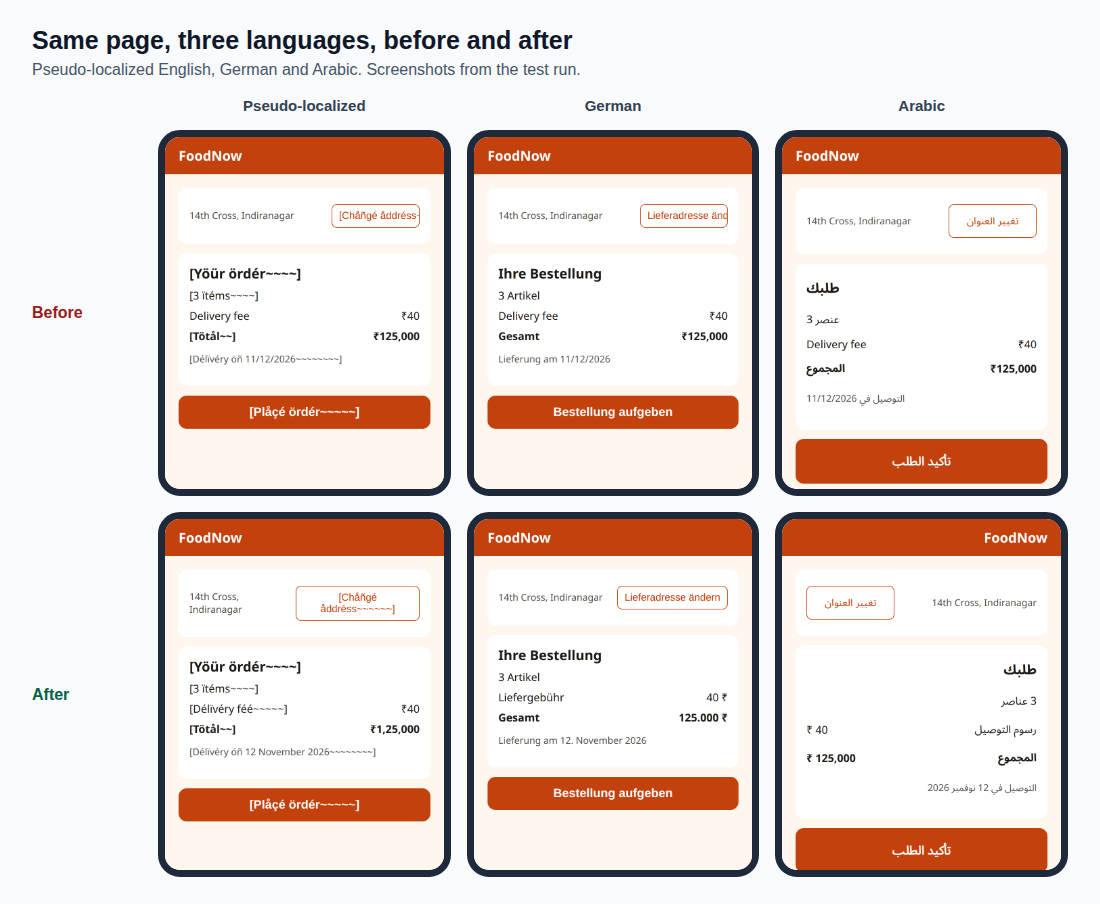
- The address button cuts its text off. In German, "Lieferadresse ändern" needs 162 pixels and gets 128. Pseudo-localized, it needs 191. And the one we didn't plant: the English button is cut off too, by 2 pixels. "Change address" needs 130 pixels in the font on our machine. It probably fitted in whatever font the button was designed with. A fixed width with hidden overflow fails as soon as the font, the language or the user's text size changes.
- ₹125,000 is wrong for Indian readers, who group digits as ₹1,25,000 (one lakh, twenty-five thousand). In German, it reads as if the comma were a decimal point: one hundred twenty-five rupees.
- 11/12/2026 means 11 December to an Indian, German or Arabic reader. The delivery is on 12 November. A delivery date that's wrong by a month is a real bug, not a cosmetic one.
- Arabic plurals were only right for 1 and 100, by luck: English's "one or other" rule happens to match those two of Arabic's six forms.
- No right-to-left layout. The Arabic text is there, but the page runs left to right: the heading on the left, numbers and labels on the wrong sides.
The German page showed four of these at once:
Step 5: Fix it with the platform, not by hand
Browsers already know every one of these rules, through the Intl APIs. The fix is mostly to stop overriding them:
-  .addr button { width: 130px; white-space: nowrap; overflow: hidden; ... }
+  .addr button { min-width: 130px; max-width: 60%; ... }
...
-    <div class="row"><span>Delivery fee</span><span id="fee"></span></div>
+    <div class="row"><span id="fee-label"></span><span id="fee"></span></div>
...
+  const LOCALES = { en: "en-IN", hi: "hi-IN", de: "de-DE", ar: "ar", "en-XA": "en-IN" };
+  const locale = LOCALES[lang] || "en-IN";
+  document.documentElement.lang = lang;
+  document.documentElement.dir = lang === "ar" ? "rtl" : "ltr";
+
-  const money = paise => "₹" + (paise / 100).toLocaleString("en-US");
+  const moneyFormat = new Intl.NumberFormat(locale, { style: "currency", currency: "INR", maximumFractionDigits: 0 });
+  const money = paise => moneyFormat.format(paise / 100);
+  const plural = new Intl.PluralRules(locale);
...
-  document.getElementById("count").textContent = t(items === 1 ? "item_one" : "item_other", { n: items });
+  const form = plural.select(items);
+  document.getElementById("count").textContent = t(s[`item_${form}`] ? `item_${form}` : "item_other", { n: items });
+  document.getElementById("fee-label").textContent = t("fee");
...
-  ... t("deliver_on", { date: when.toLocaleDateString("en-US") });
+  ... t("deliver_on", { date: when.toLocaleDateString(locale, { dateStyle: "long" }) });
- Buttons grow and wrap instead of hiding text. Design for the longest language, not for English.
- Every label comes from the translations, including "Delivery fee".
Intl.NumberFormatformats money for the locale: ₹1,25,000 in India, 125.000 ₹ in Germany.Intl.PluralRulespicks the right plural form, so Arabic gets all six.- Dates use the long format, "12 November 2026", which nobody can misread. Avoid all-number dates in anything a customer reads.
langanddiron the page.dir="rtl"flips the whole layout for Arabic.langlets screen readers pronounce the text correctly, and lets the browser choose the right fonts.
$ pytest tests -q
....................                                                     [100%]
20 passed in 4.34s
What automated tests can't check
The tests above check that the app is ready for other languages. They can't tell you whether:
- The translation is right. "Bestellung aufgeben" is the usual German for "place order". A machine translation might produce something technically correct that no German shop would write.
- The tone fits. Formal or informal "you" (German Sie or du, Hindi आप or तुम) is a brand decision.
- Images, colours and examples make sense in the region. A dish, a gesture or a holiday that's normal in one country can confuse or offend in another.
- Legal and regional rules are met: address formats, tax display, required notices.
That's linguistic and cultural testing, done by native speakers reading the real app, ideally on the screens and in the situations real users have. Give them the app, not a spreadsheet of strings: a translation can be right in a spreadsheet and wrong on the button.
Common mistakes
- Waiting for translations to start testing. Pseudo-localization finds hardcoded text and cut-off layouts on day one.
- Building text from pieces.
"You have " + n + " items"can't be translated: word order and plurals differ. Translate whole sentences with placeholders. - English plural logic.
n === 1 ? one : manyis wrong for Arabic, Russian, Polish and many more. UseIntl.PluralRules. - Formatting numbers and dates by hand. Use
Intl.NumberFormatandIntl.DateTimeFormatwith the user's locale. - Fixed widths with hidden overflow. They cut off German, pseudo-localized text and, in our run, English too.
- Testing right-to-left by checking an element's box. Boxes are often full width. Check where the text actually is, and look at the screen.
- No fonts on the test machine. Your screenshots show empty boxes, and you can't see what users see.
What's next
In Part 16 of Testing in Practice we look at flaky tests: why a test passes and fails without a code change, how to find which tests are flaky, and how to fix the causes, with the clock test from Part 14 and the race from Part 12 as real examples.
ProvaLab's QA Infrastructure runs browser tests in the cloud, with a live view while they run, and ProvaLab's pytest plugin sends each localized test's result, one per language, to the ProvaLab test management system. Each language's history stays separate, so a regression in Arabic shows up as Arabic, not as one failure among hundreds. See it in the two-minute product tour.
See ProvaLab working on a real app
Your coding agent runs the tests, reads the failures and fixes them.