Testing in Practice · Part 2
API testing with Postman and Newman (hands-on): tests, variables, a CSV of boundary values, and CI
ProvaLab team · · 12 min read
Postman is where most testers meet APIs. You type a URL, press Send, and look at the JSON that comes back. That's exploring, and it's useful. But a request you only ever send by hand isn't a test: nobody checks the answer the next time, and nobody runs it when the code changes.
This post turns Postman requests into real tests. We build a small collection for a food delivery API, add checks to every request, pass a login token from one request to the next, and run the whole thing from the command line with Newman, Postman's open-source runner. Then we feed it a CSV of boundary values, and it finds a bug that the "normal" tests walked straight past.
Every command and every line of output below was run while writing this post.
If APIs are new to you, read API testing explained first. It covers methods, status codes and what to check in a response.
What you'll build
- An API to test: a tiny FoodNow orders API, running on your own machine.
- A Postman collection: 7 requests in two folders, with 13 checks.
- An environment: the base URL and login, kept out of the requests so you can point the same tests at local, staging or production.
- A data-driven run: one request, six tip values from a CSV file.
- A run you can put in CI: one command, an exit code, and a JUnit report.
We used these versions:
| Tool | Version |
|---|---|
| Newman | 6.2.3 |
| Node.js | 20.19.5 |
| Python (for the API) | 3.12 |
| FastAPI / uvicorn | 0.162.2 / 0.54.0 |
Step 1: Start the API under test (2 minutes)
The API has four endpoints: log in, read the menu, place an order, read an order. Orders take a delivery tip, and the requirement is the one from How to write test cases: a tip from 0 to 200.
Save this as api.py:
"""FoodNow orders API: just enough to test with Postman and Newman."""
import itertools
from fastapi import Depends, FastAPI, Header, HTTPException
from pydantic import BaseModel, Field

app = FastAPI(title="FoodNow")

USERS = {"[email protected]": "pizza123"}
TOKENS: dict[str, str] = {}
MENU = {1: {"id": 1, "name": "Margherita pizza", "price": 500},
        2: {"id": 2, "name": "Paneer wrap", "price": 250}}
ORDERS: dict[int, dict] = {}
next_id = itertools.count(1001)


class Login(BaseModel):
    email: str
    password: str


class NewOrder(BaseModel):
    item_id: int
    tip: int = Field(0, ge=0, lt=200)  # the requirement says 0 to 200


def user(authorization: str = Header(None)) -> str:
    token = (authorization or "").removeprefix("Bearer ")
    if token not in TOKENS:
        raise HTTPException(401, "Log in first")
    return TOKENS[token]


@app.post("/login")
def login(body: Login):
    if USERS.get(body.email) != body.password:
        raise HTTPException(401, "Wrong email or password")
    token = f"tok-{len(TOKENS) + 1}"
    TOKENS[token] = body.email
    return {"token": token}


@app.get("/menu")
def menu():
    return list(MENU.values())


@app.post("/orders", status_code=201)
def create_order(body: NewOrder, email: str = Depends(user)):
    item = MENU.get(body.item_id)
    if not item:
        raise HTTPException(404, "No such item")
    order = {"id": next(next_id), "item": item["name"], "subtotal": item["price"],
             "tip": body.tip, "total": item["price"] + body.tip, "customer": email}
    ORDERS[order["id"]] = order
    return order


@app.get("/orders/{order_id}")
def get_order(order_id: int, email: str = Depends(user)):
    order = ORDERS.get(order_id)
    if not order or order["customer"] != email:
        raise HTTPException(404, "No such order")
    return order
There's a bug in it, the kind that ships every week. Look at the tip line if you want a head start. Otherwise, let's see whether our tests find it.
Start it with uv:
uv run --with fastapi==0.162.2 --with uvicorn==0.54.0 uvicorn api:app --port 8077
Step 2: The pieces of a Postman collection
A collection is a saved set of requests, in folders, with everything Postman needs to send them again. Four features turn it from a bookmark list into a test suite:
| Feature | What it does | In our collection |
|---|---|---|
Variables {{like_this}} |
Fill in a value when the request is sent | {{baseUrl}}, {{token}}, {{orderId}} |
| Environment | A named set of variables, swapped in one click | Local with the base URL, email and password |
| Test script | JavaScript that runs after the response arrives | pm.test("status is 201", ...) |
| Pre-request script | JavaScript that runs before the request is sent | Log in once, before the first order |
In the app, you'll find these on each request's Scripts tab (Pre-request and Post-response), and the variables on the collection's Variables tab. Postman saves the whole collection as a JSON file, and that file is what Newman runs. It also goes into git next to your code, so a pull request can show what changed in the tests.
We wrote our collection as that JSON file directly. To see it in the app, use Import and choose the file: you get the same folders, requests and scripts.
Step 3: Write the requests and their tests
Our collection has two folders.
Happy path, in this order, because each request uses what the one before it saved:
Log in:
POST {{baseUrl}}/loginwith the email and password from the environment. The test saves the token:pm.test("status is 200", () => pm.response.to.have.status(200)); const token = pm.response.json().token; pm.test("returns a token", () => pm.expect(token).to.be.a("string").and.not.empty); pm.collectionVariables.set("token", token);Get the menu:
GET {{baseUrl}}/menu. Checks the data, not just the status, and puts a ceiling on the response time:pm.test("status is 200", () => pm.response.to.have.status(200)); const menu = pm.response.json(); pm.test("pizza costs 500", () => { const pizza = menu.find(i => i.name === "Margherita pizza"); pm.expect(pizza.price).to.eql(500); }); pm.test("answers in under 500 ms", () => pm.expect(pm.response.responseTime).to.be.below(500));Order with a tip of 50:
POST {{baseUrl}}/orderswith{"item_id": 1, "tip": 50}. It uses the collection's auth setting, Bearer token{{token}}, so every request sends the token from step 1 without you copying it anywhere. The test checks the arithmetic and saves the new order's id:pm.test("status is 201", () => pm.response.to.have.status(201)); const o = pm.response.json(); pm.test("total is subtotal + tip", () => pm.expect(o.total).to.eql(o.subtotal + 50)); pm.collectionVariables.set("orderId", o.id);Get that order:
GET {{baseUrl}}/orders/{{orderId}}, and check it's the same order:pm.test("status is 200", () => pm.response.to.have.status(200)); pm.test("it is the order we just placed", () => { const o = pm.response.json(); pm.expect(o.id).to.eql(Number(pm.collectionVariables.get("orderId"))); pm.expect(o.tip).to.eql(50); });
Passing values from one request to the next like this is called chaining. It's what makes a collection test a whole flow (log in, order, check the order) instead of single requests in isolation.
Errors, the negative tests:
Order without logging in: the same order with auth set to No Auth. Expect
401.Order with a tip of 250: expect
422, and check the error points at the right field:pm.test("status is 422", () => pm.response.to.have.status(422)); pm.test("the error names the tip field", () => pm.expect(pm.response.json().detail[0].loc).to.include("tip"));Order an item that does not exist:
item_id99. Expect404.
The environment file, local.postman_environment.json, holds the three values that change from one place to another:
{
  "name": "Local",
  "values": [
    { "key": "baseUrl", "value": "http://localhost:8077", "enabled": true },
    { "key": "email", "value": "[email protected]", "enabled": true },
    { "key": "password", "value": "pizza123", "enabled": true, "type": "secret" }
  ]
}
For staging you'd have a second file with a different baseUrl and a test account. The requests and tests don't change at all.
Step 4: Run it with Newman
Newman runs a collection from the terminal, with no app and no account. With Node.js installed:
npx [email protected] run foodnow.postman_collection.json -e local.postman_environment.json
FoodNow API

❏ Happy path
↳ Log in
  POST http://localhost:8077/login [200 OK, 142B, 23ms]
  ✓  status is 200
  ✓  returns a token

↳ Get the menu
  GET http://localhost:8077/menu [200 OK, 215B, 4ms]
  ✓  status is 200
  ✓  pizza costs 500
  ✓  answers in under 500 ms

↳ Order with a tip of 50
  POST http://localhost:8077/orders [201 Created, 234B, 3ms]
  ✓  status is 201
  ✓  total is subtotal + tip

↳ Get that order
  GET http://localhost:8077/orders/1001 [200 OK, 229B, 3ms]
  ✓  status is 200
  ✓  it is the order we just placed

❏ Errors
↳ Order without logging in
  POST http://localhost:8077/orders [401 Unauthorized, 160B, 3ms]
  ✓  status is 401

↳ Order with a tip of 250
  POST http://localhost:8077/orders [422 Unprocessable Entity, 265B, 3ms]
  ✓  status is 422
  ✓  the error names the tip field

↳ Order an item that does not exist
  POST http://localhost:8077/orders [404 Not Found, 157B, 3ms]
  ✓  status is 404

┌─────────────────────────┬─────────────────┬─────────────────┐
│                         │        executed │          failed │
├─────────────────────────┼─────────────────┼─────────────────┤
│              iterations │               1 │               0 │
├─────────────────────────┼─────────────────┼─────────────────┤
│                requests │               7 │               0 │
├─────────────────────────┼─────────────────┼─────────────────┤
│            test-scripts │               7 │               0 │
├─────────────────────────┼─────────────────┼─────────────────┤
│      prerequest-scripts │               0 │               0 │
├─────────────────────────┼─────────────────┼─────────────────┤
│              assertions │              13 │               0 │
├─────────────────────────┴─────────────────┴─────────────────┤
│ total run duration: 160ms                                   │
├─────────────────────────────────────────────────────────────┤
│ total data received: 484B (approx)                          │
├─────────────────────────────────────────────────────────────┤
│ average response time: 6ms [min: 3ms, max: 23ms, s.d.: 6ms] │
└─────────────────────────────────────────────────────────────┘
Thirteen checks, all green, in 160 milliseconds. You can see the chaining working: the order request got 201, and the next request fetched /orders/1001, the id it saved.
And the API still has a bug in it. Every one of these tests is correct. They just never asked the question that matters.
Step 5: Drive it from a CSV of boundary values
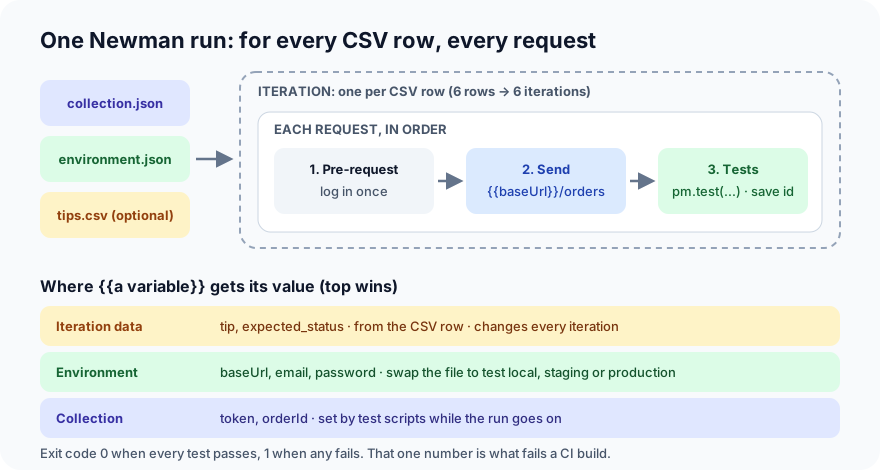
In Test design techniques we said bugs love edges: test at and around each boundary. For a tip from 0 to 200 that's six values: −1, 0, 1, 199, 200 and 201. Writing six requests would be copy-paste. Instead, write one request and give Newman a data file. It runs the collection once per row, an iteration, and the test reads that row's values.
tips.csv:
tip,expected_status
-1,422
0,201
1,201
199,201
200,201
201,422
A second, small collection has one request, Order with the tip from tips.csv, with the body {"item_id": 1, "tip": {{tip}}}. Here {{tip}} comes from the CSV row. Its pre-request script logs in on the first iteration only, using pm.sendRequest:
// Log in once, before the first request, and keep the token for the others.
if (!pm.collectionVariables.get("token")) {
    pm.sendRequest({
        url: pm.environment.get("baseUrl") + "/login",
        method: "POST",
        header: { "Content-Type": "application/json" },
        body: { mode: "raw", raw: JSON.stringify({
            email: pm.environment.get("email"),
            password: pm.environment.get("password"),
        }) },
    }, (err, res) => pm.collectionVariables.set("token", res.json().token));
}
And its test compares the status with the row's expected_status:
const tip = pm.iterationData.get("tip");
const expected = Number(pm.iterationData.get("expected_status"));
pm.test(`tip ${tip} → ${expected}`, () => pm.response.to.have.status(expected));
Run it with -d for the data file:
npx [email protected] run tip-boundaries.postman_collection.json -e local.postman_environment.json -d tips.csv
Iteration 1/6
→ Order with the tip from tips.csv
  POST http://localhost:8077/login [200 OK, 142B, 25ms]
  POST http://localhost:8077/orders [422 Unprocessable Entity, 284B, 4ms]
  ✓  tip -1 → 422
...
Iteration 4/6
→ Order with the tip from tips.csv
  POST http://localhost:8077/orders [201 Created, 235B, 4ms]
  ✓  tip 199 → 201

Iteration 5/6
→ Order with the tip from tips.csv
  POST http://localhost:8077/orders [422 Unprocessable Entity, 265B, 2ms]
  1. tip 200 → 201

Iteration 6/6
→ Order with the tip from tips.csv
  POST http://localhost:8077/orders [422 Unprocessable Entity, 265B, 3ms]
  ✓  tip 201 → 422

  #  failure         detail
 1.  AssertionError  tip 200 → 201
     iteration: 5    expected response to have status code 201 but got 422
                     at assertion:0 in test-script
                     inside "Order with the tip from tips.csv"
A tip of exactly 200 is refused. The requirement says 0 to 200, so 200 must be accepted. The cause is the line we pointed at: lt=200 means "less than 200". It should be le=200, "less than or equal". It's the classic off-by-one at a boundary. The happy-path test (tip 50) and the obvious negative test (tip 250) both passed, because neither of them is anywhere near the edge.
Notice the login request appears only in iteration 1. The pre-request script saw the token on later iterations and skipped it.
Step 6: Fix it, and make the run CI-ready
The fix is two letters:
-    tip: int = Field(0, ge=0, lt=200)  # the requirement says 0 to 200
+    tip: int = Field(0, ge=0, le=200)  # the requirement says 0 to 200
Restart the API and run again, this time adding a JUnit report, the XML format almost every CI system can read and display:
npx [email protected] run tip-boundaries.postman_collection.json -e local.postman_environment.json -d tips.csv \
  --reporters cli,junit --reporter-junit-export results/tips.xml
  ✓  tip -1 → 422
  ✓  tip 0 → 201
  ✓  tip 1 → 201
  ✓  tip 199 → 201
  ✓  tip 200 → 201
  ✓  tip 201 → 422
│              assertions │               6 │               0 │
<testsuites name="FoodNow tip boundaries" tests="6" time="0.019">
  <testsuite name="Order with the tip from tips.csv" tests="1" failures="0" errors="0" time="0.003">
    <testcase name="tip -1 → 422" time="0.003" classname="OrderWithTheTipFromTipsCsv"/>
    <testcase name="tip 0 → 201" time="0.003" classname="OrderWithTheTipFromTipsCsv"/>
The first lines of the report (we've left out the generated ids and timestamps) show one test case per CSV row. The main collection still passes all 13 checks too. Two things make this ready for a pipeline:
- The exit code. Newman exits with
1when any test fails (our first boundary run did) and0when all pass. That's all a CI job needs to go red or green. - The JUnit file. CI tools turn it into a list of passed and failed tests on the build page, so nobody has to scroll through a log.
Run it in your CI system and you have an API test stage. A full CI pipeline gets its own post later in this series.
Common mistakes
- Tests that only check the status.
200 OKwith the wrong total is still a bug. Check the values that matter: the price, the total, the id you just created. - Hard-coded URLs and tokens.
http://localhost:8077typed into 40 requests means 40 edits for staging. Put it in the environment once. Same for tokens: log in in the collection, never paste one in. - Requests that depend on each other by accident. Chaining on purpose is fine: log in, order, read the order. But if test 12 only passes because test 7 happened to create some data, a reordered or filtered run breaks for no visible reason. Keep each folder able to run on its own.
- Secrets in the exported files. Collections and environments end up in git. Mark passwords as secret, use test accounts, and pass real secrets from the CI system with
--env-var "password=...". - Only happy-path values. As the run above shows, a correct-looking suite can miss a boundary bug completely. Test the edges.
Postman, Newman, or code?
| Postman + Newman | Code (pytest + requests) | |
|---|---|---|
| Getting started | Fastest: click, send, see | Needs a little Python |
| Exploring a new API | Excellent | Clumsy |
| Sharing with non-coders | Easy | Harder |
| Complex logic, fixtures, reuse | Possible, gets messy in scripts | Natural |
| Reviewing changes in git | One large JSON file | Readable diffs |
Many teams use both: Postman to explore and to share examples, code for the regression suite that grows over years. Your first API tests builds the code version of what we did here.
What's next
In Part 3 of Testing in Practice we catch the bugs functional tests can't see: visual regression testing with Playwright screenshots, baselines, masks and thresholds.
ProvaLab's QA AI Agent runs API test cases on its own and records every request and response against its test case, and AppSec's API fuzzing sends thousands of malformed and unauthorised requests to find what a hand-written collection misses. See it in the two-minute product tour.
See ProvaLab working on a real app
Your coding agent runs the tests, reads the failures and fixes them.