ZAP in practice: scanning behind a login with the Automation Framework, failing the build, and what no scanner finds
ProvaLab team · · 12 min read
In your first ZAP scan we scanned an API that used a bearer token, so getting past the login was one header. Most web apps aren't like that. You sign in through a form, the app sets a session cookie, and everything worth attacking sits behind it. Point a scanner at the front page, and it tests the front page.
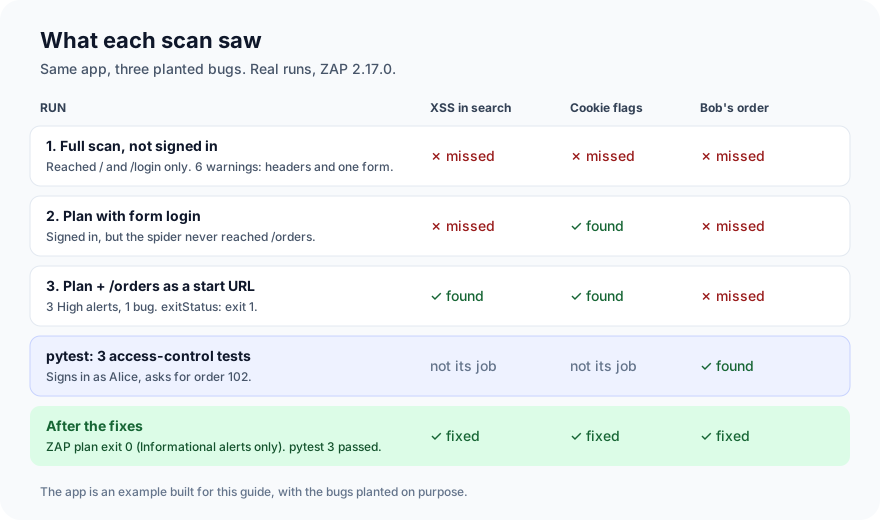
This guide scans a small web app the way you'd scan a real one. We start with a scan that looks thorough and misses the main bug, then build a ZAP Automation Framework plan that signs in, stays signed in, finds the bug and fails the build. Then we write the tests for the bug no scanner will find. Every run below is real:
| Tool | Version |
|---|---|
| ZAP | 2.17.0 (Docker image zaproxy/zap-stable) |
| FastAPI | 0.162.5 |
| pytest | 9.2.0 |
The app: FoodNow's order pages (example code)
FoodNow is the food delivery app we use as the example across our posts. This is a tiny version of its website with three bugs planted on purpose. Don't deploy it.
- The order search page prints the search term back without escaping it: reflected cross-site scripting (XSS).
- The session cookie is set without
HttpOnlyorSameSite. - The order page checks that you're signed in, but not that the order is yours.
# app.py: example app with planted vulnerabilities, never deploy
import html
import secrets

from fastapi import Cookie, FastAPI, Form, HTTPException
from fastapi.responses import HTMLResponse, RedirectResponse

app = FastAPI()
USERS = {"alice": "alice-pass-123", "bob": "bob-pass-456"}
ORDERS = {
    101: {"user": "alice", "items": "Veg thali x2", "address": "12 MG Road, Pune"},
    102: {"user": "bob", "items": "Butter naan x4", "address": "7 Park Street, Kolkata"},
}
SESSIONS: dict[str, str] = {}


def page(title: str, body: str) -> HTMLResponse:
    return HTMLResponse(f"<!doctype html><html lang='en'><head><title>{title}</title></head>"
                        f"<body><h1>{title}</h1>{body}</body></html>")


def current_user(session: str | None) -> str:
    user = SESSIONS.get(session or "")
    if not user:
        raise HTTPException(303, headers={"Location": "/login"})
    return user


@app.get("/", response_class=HTMLResponse)
def home():
    return page("FoodNow", "<p>Hot food, fast.</p><a href='/login'>Sign in</a>")


@app.get("/login", response_class=HTMLResponse)
def login_form():
    return page("Sign in", "<form method='post' action='/login'>"
                "<label>User <input name='username'></label>"
                "<label>Password <input name='password' type='password'></label>"
                "<button>Sign in</button></form>")


@app.post("/login")
def login(username: str = Form(...), password: str = Form(...)):
    if USERS.get(username) != password:
        return page("Sign in", "<p>Wrong user or password.</p><a href='/login'>Try again</a>")
    token = secrets.token_hex(16)
    SESSIONS[token] = username
    resp = RedirectResponse("/orders", status_code=303)
    resp.set_cookie("session", token)                      # planted: no HttpOnly, no SameSite
    return resp


@app.get("/orders", response_class=HTMLResponse)
def my_orders(session: str | None = Cookie(None)):
    user = current_user(session)
    rows = "".join(f"<li><a href='/orders/{oid}'>Order {oid}</a></li>"
                   for oid, o in ORDERS.items() if o["user"] == user)
    return page("Your orders", f"<p>Signed in as {html.escape(user)}. <a href='/logout'>Sign out</a></p>"
                "<form action='/orders/search'><input name='q'><button>Search</button></form>"
                f"<ul>{rows}</ul>")


@app.get("/orders/search", response_class=HTMLResponse)
def search(q: str = "", session: str | None = Cookie(None)):
    user = current_user(session)
    found = [oid for oid, o in ORDERS.items() if o["user"] == user and q.lower() in o["items"].lower()]
    return page("Search", f"<p>Results for {q}: {len(found)}</p>")   # planted: q not escaped


@app.get("/orders/{oid}", response_class=HTMLResponse)
def order(oid: int, session: str | None = Cookie(None)):
    current_user(session)                                   # planted: never checks the owner
    o = ORDERS.get(oid)
    if not o:
        raise HTTPException(404)
    return page(f"Order {oid}", f"<p>{html.escape(o['items'])}</p><p>{html.escape(o['address'])}</p>")


@app.get("/logout")
def logout(session: str | None = Cookie(None)):
    SESSIONS.pop(session or "", None)
    return RedirectResponse("/", status_code=303)
pip install fastapi uvicorn python-multipart
uvicorn app:app --host 0.0.0.0 --port 8030
docker pull zaproxy/zap-stable        # about 3.7 GB
mkdir wrk && chmod 777 wrk            # ZAP runs as a non-root user and writes reports here
Scan 1: the full scan, without signing in (2 minutes)
ZAP ships three ready-made scan scripts: zap-baseline.py (spider and passive checks only), zap-api-scan.py (from an OpenAPI file, as in the first guide) and zap-full-scan.py (spider plus active attacks). Full scan sounds thorough:
docker run --rm --network host -v "$PWD/wrk:/zap/wrk:rw" zaproxy/zap-stable \
  zap-full-scan.py -P 8099 -t http://localhost:8030/ -m 1 -r full-noauth.html -J full-noauth.json
(-P 8099 moves ZAP off port 8080, in case something on your machine already uses it. -m 1 gives the spider one minute.)
WARN-NEW: Missing Anti-clickjacking Header [10020] x 3
	http://localhost:8030/ (200 OK)
	http://localhost:8030/login (200 OK)
WARN-NEW: X-Content-Type-Options Header Missing [10021] x 3
WARN-NEW: Content Security Policy (CSP) Header Not Set [10038] x 3
WARN-NEW: Permissions Policy Header Not Set [10063] x 3
WARN-NEW: Absence of Anti-CSRF Tokens [10202] x 1
	http://localhost:8030/login (200 OK)
WARN-NEW: Cross-Origin-Resource-Policy Header Missing or Invalid [90004] x 9
FAIL-NEW: 0	FAIL-INPROG: 0	WARN-NEW: 6	WARN-INPROG: 0	INFO: 0	IGNORE: 0	PASS: 137
137 checks passed, 6 warnings, no failures, done in 1 minute 37 seconds. It looks like a clean bill of health. Look at the URLs instead: / and /login, nothing else. ZAP can't sign in, so it never saw the order pages, never got a session cookie, and never tried an attack on the search box. The XSS and the cookie are both still there.
Lesson one: before you read a scan's findings, read its list of URLs. A scan is only as good as the pages it reached.
Scan 2: an Automation Framework plan that signs in (10 minutes)
The packaged scripts are fine for a quick look. For anything with a login, use the Automation Framework: one YAML file that describes the app, how to sign in, and which jobs to run in which order. It goes in version control next to your code.
# wrk/zap.yaml
env:
  contexts:
    - name: foodnow
      urls:
        - http://localhost:8030/
      includePaths:
        - "http://localhost:8030.*"
      excludePaths:
        - "http://localhost:8030/logout"     # or the spider signs itself out
      authentication:
        method: form
        parameters:
          loginPageUrl: http://localhost:8030/login
          loginRequestUrl: http://localhost:8030/login
          loginRequestBody: "username={%username%}&password={%password%}"
        verification:
          method: poll
          pollUrl: http://localhost:8030/orders
          pollFrequency: 60
          pollUnits: requests
          loggedInRegex: "Signed in as"
          loggedOutRegex: "<h1>Sign in</h1>"
      sessionManagement:
        method: cookie
      users:
        - name: alice
          credentials:
            username: alice
            password: ${ALICE_PASSWORD}     # from the environment, never in the file
  parameters:
    failOnError: true
    progressToStdout: true
jobs:
  - type: spider
    parameters:
      context: foodnow
      user: alice
      maxDuration: 1
  - type: passiveScan-wait
  - type: activeScan
    parameters:
      context: foodnow
      user: alice
      maxScanDurationInMins: 5
  - type: report
    parameters:
      template: traditional-json
      reportDir: /zap/wrk
      reportFile: af-auth
What the important parts do:
authenticationtells ZAP how to sign in: which URL to post to, with{%username%}and{%password%}filled in from the user.verificationis how ZAP knows it's still signed in. Every 60 requests it fetches/ordersand looks for "Signed in as". Without this, a scan that gets signed out partway through carries on, testing the sign-in page over and over.excludePathskeeps the spider away from/logout. Forget it, and the spider clicks "Sign out" early on.${ALICE_PASSWORD}comes from an environment variable, so the password lives in your CI secrets, not in the repository.
Run it:
docker run --rm --network host -e ALICE_PASSWORD=alice-pass-123 \
  -v "$PWD/wrk:/zap/wrk:rw" zaproxy/zap-stable \
  zap.sh -cmd -port 8099 -autorun /zap/wrk/zap.yaml
Job spider requesting URL http://localhost:8030/
Job spider found 6 URLs
Job activeScan finished, time taken: 00:01:10
Automation plan succeeded!
The sign-in worked: the report now has Cookie No HttpOnly Flag [10010], raised on the response to the /login post, which only a signed-in run sees. But there is no XSS. Look at the spider again: 6 URLs, starting from /. The home page links only to /login, and nothing the spider could follow from there led to /orders. ZAP signs in with its own login request; that doesn't tell the spider where the signed-in pages are. So it never found /orders, the search form, or /orders/search.
Lesson two: signing in isn't enough. The spider has to be able to reach the pages behind the login.
Scan 3: give the spider a way in (2 minutes)
Two small changes: add /orders to the context's URLs, and start the spider there.
      urls:
        - http://localhost:8030/
        - http://localhost:8030/orders
...
  - type: spider
    parameters:
      context: foodnow
      user: alice
      url: http://localhost:8030/orders
      maxDuration: 1
Job spider requesting URL http://localhost:8030/
Job spider requesting URL http://localhost:8030/orders
Job spider found 10 URLs
Job activeScan finished, time taken: 00:01:44
Now the report has what we planted:
[40012] High (Medium)  Cross Site Scripting (Reflected) x1
        GET /orders/search  param=q  attack=</p><scrIpt>alert(1);</scRipt><p>
[40026] High (High)    Cross Site Scripting (DOM Based) x2
        GET /orders/search?q=<script>alert(5397)</script>
        GET /orders#jaVasCript:/*-/*`/*\`/*'/*"/**/(/* */oNcliCk=alert(5397) )//...
[10010] Low (Medium)   Cookie No HttpOnly Flag x1
For a single-page app, you'd also add the spiderAjax job, which drives a real browser to find links that only exist after JavaScript runs. This app has no JavaScript, so the classic spider is enough.
Triage: three alerts, one bug (5 minutes)
Three High alerts. Before you file three tickets, read the evidence. The odd one is a DOM-based XSS on /orders, a page that has no JavaScript at all. ZAP's "Other info" for it lists the steps its browser took:
Access: http://localhost:8030/orders<PAYLOAD_0>
Write to /html/body/form/input the value: <PAYLOAD_0>
Click element: /html/body/form/button
It typed the attack into the search box and clicked Search, which loaded /orders/search?q=…. That's the same unescaped q that rule 40012 found. Three alerts, one bug, one fix. The DOM XSS rule reports where the browser started, not where the problem is. Scanners report symptoms; grouping them by cause is your job.
The other result worth a decision is Absence of Anti-CSRF Tokens on the sign-in form. Login CSRF is a real but small risk, so say we've decided to accept it for now and track it. Record that decision in the plan with an alertFilter job, placed before the scans so it is in place when the alert is raised:
jobs:
  - type: alertFilter
    alertFilters:
      - ruleId: 10202            # Absence of Anti-CSRF Tokens
        url: "http://localhost:8030/login"
        newRisk: "Info"          # decision: login CSRF accepted for now, see ticket
  - type: spider
  ...
Use filters for decisions like this, and for confirmed false positives (newRisk: "False Positive"), always with a comment saying why. A filter without a reason becomes a hole nobody remembers making.
Fail the build on High (2 minutes)
A scan that only writes a report never blocks anything. Add an exitStatus job at the end of the plan:
  - type: exitStatus
    parameters:
      errorLevel: High
      warnLevel: Medium
Against the buggy app:
Job exitStatus started
An alert has been raised with a risk of at least: Medium
An alert has been raised with a risk of at least: High
Automation plan failures:
	An alert has been raised with a risk of at least: High
Automation plan warnings:
	An alert has been raised with a risk of at least: Medium
exit 1
Exit code 1 fails the CI job. The login CSRF alert no longer counts towards it, because the filter turned it into Info.
What no ZAP run found (5 minutes)
Look back at the first screen: Alice could open /orders/102, Bob's order, with his address. None of the scans reported it, and none could have. To ZAP, /orders/102 returning a page is a success. It doesn't know which orders are Alice's. This is broken access control, the number one risk in the OWASP Top 10, and it is found by tests that know your business rules:
# tests/test_access.py
import os

import pytest
import requests

BASE = os.environ.get("BASE", "http://localhost:8030")


def signed_in(user, password):
    s = requests.Session()
    r = s.post(f"{BASE}/login", data={"username": user, "password": password})
    assert "Signed in as" in r.text
    return s


@pytest.fixture
def alice():
    return signed_in("alice", "alice-pass-123")


def test_alice_can_read_her_own_order(alice):
    r = alice.get(f"{BASE}/orders/101")
    assert r.status_code == 200
    assert "12 MG Road" in r.text


def test_alice_cannot_read_bobs_order(alice):
    r = alice.get(f"{BASE}/orders/102")
    assert r.status_code == 404          # 404, not 403: don't confirm the order exists
    assert "Park Street" not in r.text


def test_signed_out_user_is_sent_to_login():
    r = requests.get(f"{BASE}/orders/101", allow_redirects=False)
    assert r.status_code == 303
    assert r.headers["location"] == "/login"
$ pytest -q tests
E       assert 200 == 404
E        +  where 200 = <Response [200]>.status_code
1 failed, 2 passed in 0.16s
Fix everything and run both again (5 minutes)
 app = FastAPI()
+
+
[email protected]("http")
+async def security_headers(request, call_next):
+    resp = await call_next(request)
+    resp.headers["Content-Security-Policy"] = "default-src 'self'; frame-ancestors 'none'; form-action 'self'"
+    resp.headers["X-Frame-Options"] = "DENY"
+    resp.headers["X-Content-Type-Options"] = "nosniff"
+    return resp

-    resp.set_cookie("session", token)
+    resp.set_cookie("session", token, httponly=True, samesite="lax")  # add secure=True behind HTTPS

-    return page("Search", f"<p>Results for {q}: {len(found)}</p>")
+    return page("Search", f"<p>Results for {html.escape(q)}: {len(found)}</p>")

-    current_user(session)
+    user = current_user(session)
     o = ORDERS.get(oid)
-    if not o:
+    if not o or o["user"] != user:                          # someone else's order: same as missing
$ pytest -q tests
3 passed in 0.09s

$ docker run ... zap.sh -cmd -port 8099 -autorun /zap/wrk/zap.yaml
Job spider found 10 URLs
Job exitStatus started
Job exitStatus finished, time taken: 00:00:00
Automation plan succeeded!
exit 0
What is left in the report is Informational only: the sign-in request and session cookie ZAP identified, and the login CSRF we decided to accept. The spider still found 10 URLs, so the clean result means "tested and clean", not "never reached".
In CI
The same command runs in any pipeline that has Docker. Start the app, run the plan with the password from your secrets, and keep the report:
      - name: ZAP scan (signed in)
        run: |
          docker run --rm --network host \
            -e ALICE_PASSWORD="${{ secrets.ZAP_TEST_PASSWORD }}" \
            -v "$PWD/wrk:/zap/wrk:rw" zaproxy/zap-stable \
            zap.sh -cmd -port 8099 -autorun /zap/wrk/zap.yaml
      - uses: actions/upload-artifact@v4
        if: always()
        with: { name: zap-report, path: wrk/af-auth.* }
Scan a test environment with test accounts, never production, and never with a real customer's login. An active scan sends thousands of attack requests, and fills in every form it finds.
Habits worth keeping
- Read the list of URLs before the findings. A clean scan of two pages proves nothing about the rest.
- Use an Automation Framework plan for anything with a login, kept in the repo, with credentials from the environment.
- Verify the session with a logged-in check, and exclude logout.
- Give the spider start URLs behind the login. Logging in doesn't tell it where the pages are.
- Group alerts by cause before filing them. Three alerts here were one line of code.
- Record every filter's reason in the plan.
- Fail the build with
exitStatus, and pair the scan with access-control tests. The scanner finds the generic mistakes; the tests find the ones that depend on who owns what.
What's next
A scanner finds the generic mistakes in a running app. To cover the rest, you want code scanning, dependency checks and secrets detection on every change, and the findings kept in one place where someone triages them. ProvaLab AppSec runs code, dependency, secrets and running-app scans on your projects, and keeps each finding's history so a fixed issue can be re-checked rather than re-filed. See it in the two-minute product tour.
New to ZAP? Start with Your first security scan with OWASP ZAP. The other tool guides in this run: pytest in practice and k6 in practice.
See ProvaLab working on a real app
Your coding agent runs the tests, reads the failures and fixes them.