Testing in Practice · Part 4
Testing database changes (hands-on): transactions, race conditions and migrations with SQL and pytest
ProvaLab team · · 14 min read
Most tests check what the code says. The API returned 409, the function raised OutOfStock, the page showed "Sorry, out of stock". But what the code says and what it saved can be different things. A test that only checks the response will pass while the database fills up with half-written orders, oversold stock and totals that don't add up.
Database testing checks what is actually stored after your code runs. This post builds a small order system for FoodNow, our food delivery example, on a real PostgreSQL database. It then tests it with pytest and plain SQL.
Every command and every line of output below was run while writing this post. Two bugs are planted in the code. The usual tests pass with both of them in. The database tests catch both, and a third bug that lives in a migration.
What to check when code writes to a database
| Check | The question it answers |
|---|---|
| The right rows | Did it save what it should, with the right values? |
| Nothing else | Did anything change that shouldn't have? Extra rows, other customers' data, stock of other items? |
| All or nothing | When it fails halfway, does it undo the first half? |
| Constraints | Does the database itself refuse bad data, even if the code forgets to check? |
| Two at once | What happens when two requests change the same row at the same moment? |
| Migrations | Does a schema change work on a database that already has data in it? |
The first one is what most people test. The bugs are usually in the other five.
Step 1: Set up (5 minutes)
You need Docker and Python 3.10 or newer. Start PostgreSQL and make an empty database for the tests:
docker run -d --name foodnow-db -e POSTGRES_PASSWORD=postgres -p 5432:5432 postgres:15
docker exec foodnow-db createdb -U postgres foodnow_test

mkdir foodnow-db && cd foodnow-db
python -m venv .venv && source .venv/bin/activate
pip install "psycopg[binary]==3.3.8" pytest==9.2.0
We used PostgreSQL 15, Python 3.11, psycopg 3.3.8 and pytest 9.2.0 on Linux.
The schema, schema.sql, has three tables: the menu, the orders, and which dishes are in each order. Prices are in whole rupees. The CHECK rules match the business rules: the tip is 0 to 200, and stock can't go below zero.
CREATE TABLE menu_items (
    id     serial PRIMARY KEY,
    name   text    NOT NULL,
    price  integer NOT NULL CHECK (price >= 0),
    stock  integer NOT NULL CHECK (stock >= 0)
);

CREATE TABLE orders (
    id         serial PRIMARY KEY,
    customer   text    NOT NULL,
    tip        integer NOT NULL DEFAULT 0 CHECK (tip BETWEEN 0 AND 200),
    total      integer NOT NULL,
    created_at timestamptz NOT NULL DEFAULT now()
);

CREATE TABLE order_items (
    order_id integer NOT NULL REFERENCES orders(id),
    item_id  integer NOT NULL REFERENCES menu_items(id),
    qty      integer NOT NULL CHECK (qty > 0),
    PRIMARY KEY (order_id, item_id)
);
Step 2: The code under test
orders.py places an order: work out the total, save the order, then take each dish out of stock and save it as an order line. If a dish has run out, it raises OutOfStock, and the app shows "Sorry, out of stock".
class OutOfStock(Exception):
    pass


def place_order(conn, customer, items, tip=0):
    """items is {menu_item_id: quantity}. Returns the new order id."""
    total = tip
    for item_id, qty in items.items():
        price = conn.execute(
            "SELECT price FROM menu_items WHERE id = %s", (item_id,)
        ).fetchone()[0]
        total += price * qty

    order_id = conn.execute(
        "INSERT INTO orders (customer, tip, total) VALUES (%s, %s, %s) RETURNING id",
        (customer, tip, total),
    ).fetchone()[0]

    for item_id, qty in items.items():
        stock = conn.execute(
            "SELECT stock FROM menu_items WHERE id = %s", (item_id,)
        ).fetchone()[0]
        if stock < qty:
            raise OutOfStock(f"item {item_id}: {stock} left, {qty} wanted")
        conn.execute(
            "UPDATE menu_items SET stock = %s WHERE id = %s", (stock - qty, item_id)
        )
        conn.execute(
            "INSERT INTO order_items (order_id, item_id, qty) VALUES (%s, %s, %s)",
            (order_id, item_id, qty),
        )
    return order_id
It reads well, and it has two bugs. See if you can spot them before the tests do.
Step 3: A fresh database for every test
Tests that share a database start depending on each other: one test leaves a row behind, and another one fails because of it, but only when they run in a certain order. The fix is to give every test a clean start. This fixture, in tests/conftest.py, drops everything, creates the schema again, and puts three dishes on the menu:
import os
import pathlib

import psycopg
import pytest

DB_URL = os.environ.get("DB_URL", "postgresql://postgres:postgres@localhost:5432/foodnow_test")
SCHEMA = (pathlib.Path(__file__).parent.parent / "schema.sql").read_text()


@pytest.fixture
def db():
    """A fresh, empty schema for every test, with three dishes on the menu."""
    with psycopg.connect(DB_URL, autocommit=True) as conn:
        conn.execute("DROP SCHEMA public CASCADE; CREATE SCHEMA public;")
        conn.execute(SCHEMA)
        conn.execute(
            "INSERT INTO menu_items (name, price, stock) VALUES "
            "('Paneer wrap', 250, 10), ('Masala dosa', 180, 10), ('Mango lassi', 90, 1)"
        )
        yield conn
Creating the schema again takes a few milliseconds here. With hundreds of tables, teams often start each test inside a transaction and roll it back at the end instead, which is faster. That doesn't work for the race test in Step 6, though, because there other connections need to see committed data. We use the simple version for everything.
Use the same database as production. It's tempting to test with SQLite because it needs no server. But SQLite behaves differently: for example, it doesn't enforce foreign keys unless you turn them on with PRAGMA foreign_keys = ON, and its locking is nothing like PostgreSQL's. The race in Step 6 is about exactly that. A test on a different database tests a different program.
Step 4: The usual tests pass
These are the tests most teams write first. The happy path checks the stored order, the stored lines and the stock, which is already better than checking only the return value. The second test checks that an order for too many lassis is refused.
import pytest

from orders import OutOfStock, place_order

WRAP, DOSA, LASSI = 1, 2, 3


def test_order_is_saved_with_the_right_total(db):
    order_id = place_order(db, "asha", {WRAP: 2}, tip=50)

    row = db.execute("SELECT customer, tip, total FROM orders WHERE id = %s", (order_id,)).fetchone()
    assert row == ("asha", 50, 550)
    items = db.execute("SELECT item_id, qty FROM order_items WHERE order_id = %s", (order_id,)).fetchall()
    assert items == [(WRAP, 2)]
    assert db.execute("SELECT stock FROM menu_items WHERE id = %s", (WRAP,)).fetchone()[0] == 8


def test_out_of_stock_order_is_refused(db):
    with pytest.raises(OutOfStock):
        place_order(db, "ravi", {LASSI: 2})
$ python -m pytest -q tests
..                                                                       [100%]
2 passed in 0.14s
Green. And the second test is right: the order is refused. It just doesn't ask what the refusal left behind.
Step 5: Bug 1, the order that was refused and saved anyway
Ravi orders a wrap and two lassis. There is only one lassi, so he gets "Sorry, out of stock". We ran exactly that, after Asha's order from Step 4, and then looked in the database:
 id | customer | tip | total |          created_at
----+----------+-----+-------+-------------------------------
  1 | asha     |  50 |   550 | 2026-11-10 17:47:06.680316+00
  2 | ravi     |   0 |   430 | 2026-11-10 17:47:06.69123+00

 order_id | item_id | qty
----------+---------+-----
        1 |       1 |   2
        2 |       1 |   1

 id |    name     | price | stock
----+-------------+-------+-------
  1 | Paneer wrap |   250 |     7
  2 | Masala dosa |   180 |    10
  3 | Mango lassi |    90 |     1
Ravi was told his order failed, but order 2 is in the database. It has a total of 430 (one wrap plus two lassis) and only one line, a wrap, and the wrap was taken out of stock. The kitchen may cook it. A report of the day's sales will count 430 rupees nobody paid.
The cause: psycopg's autocommit=True (Django's default mode works the same way) saves each statement the moment it runs. The order row and the wrap were saved before the lassi check failed, and nothing undid them.
The test that catches it checks what the refusal left behind:
def test_refused_order_leaves_no_trace(db):
    with pytest.raises(OutOfStock):
        place_order(db, "ravi", {WRAP: 1, LASSI: 2})

    assert db.execute("SELECT count(*) FROM orders").fetchone()[0] == 0
    assert db.execute("SELECT count(*) FROM order_items").fetchone()[0] == 0
    assert db.execute("SELECT stock FROM menu_items WHERE id = %s", (WRAP,)).fetchone()[0] == 10
The same bug, found with SQL
Tests catch it before release. But what if it already happened in production? You can look for the damage with a query. This one, checks.sql, finds every order whose total doesn't match its lines plus the tip:
SELECT o.id, o.customer, o.total,
       o.tip + coalesce(sum(m.price * oi.qty), 0) AS items_plus_tip
FROM orders o
LEFT JOIN order_items oi ON oi.order_id = o.id
LEFT JOIN menu_items m ON m.id = oi.item_id
GROUP BY o.id
HAVING o.total <> o.tip + coalesce(sum(m.price * oi.qty), 0);
 id | customer | total | items_plus_tip
----+----------+-------+----------------
  2 | ravi     |   430 |            250
(1 row)
Queries like this are worth keeping. Run them after a data migration, or every night against a copy of production: they find broken data no matter which bug caused it. (This one uses today's prices, so in a real system you would store the price on each order line.)
Step 6: Bug 2, twenty customers and ten wraps
There are 10 paneer wraps. At lunchtime 20 customers press Pay at the same moment, each for one wrap. Ten should get their wrap and ten should get "out of stock".
A test can do that: 20 threads, each with its own database connection, held at a barrier so they all start together.
import threading

import psycopg

from orders import OutOfStock, place_order
from conftest import DB_URL

WRAP = 1  # 10 in stock


def test_twenty_customers_cannot_buy_ten_wraps(db):
    results = []
    start = threading.Barrier(20)

    def customer(n):
        with psycopg.connect(DB_URL, autocommit=True) as conn:
            start.wait()  # everyone clicks Pay at the same moment
            try:
                place_order(conn, f"customer{n}", {WRAP: 1})
                results.append("ok")
            except OutOfStock:
                results.append("out of stock")

    threads = [threading.Thread(target=customer, args=(n,)) for n in range(20)]
    for t in threads:
        t.start()
    for t in threads:
        t.join()

    sold = db.execute("SELECT coalesce(sum(qty), 0) FROM order_items WHERE item_id = %s", (WRAP,)).fetchone()[0]
    stock = db.execute("SELECT stock FROM menu_items WHERE id = %s", (WRAP,)).fetchone()[0]
    # (orders accepted, wraps sold, wraps left)
    assert (results.count("ok"), sold, stock) == (10, 10, 0)
Here is the full run, with the tests from Steps 5 and 6 added (the schema and migration tests are in Steps 7 and 8; this run already had the fixed migration from Step 8):
$ python -m pytest tests --tb=short
============================= test session starts ==============================
platform linux -- Python 3.11.17, pytest-9.2.0, pluggy-1.7.0
rootdir: ~/foodnow-db
collected 8 items

tests/test_concurrency.py F                                              [ 12%]
tests/test_migrations.py ..                                              [ 37%]
tests/test_orders.py ..F                                                 [ 75%]
tests/test_schema.py ..                                                  [100%]

=================================== FAILURES ===================================
__________________ test_twenty_customers_cannot_buy_ten_wraps __________________
tests/test_concurrency.py:33: in test_twenty_customers_cannot_buy_ten_wraps
    assert (results.count("ok"), sold, stock) == (10, 10, 0)
E   assert (20, 20, 9) == (10, 10, 0)
E
E     At index 0 diff: 20 != 10
E     Use -v to get more diff
______________________ test_refused_order_leaves_no_trace ______________________
tests/test_orders.py:27: in test_refused_order_leaves_no_trace
    assert db.execute("SELECT count(*) FROM orders").fetchone()[0] == 0
E   assert 1 == 0
=========================== short test summary info ============================
FAILED tests/test_concurrency.py::test_twenty_customers_cannot_buy_ten_wraps
FAILED tests/test_orders.py::test_refused_order_leaves_no_trace - assert 1 == 0
========================= 2 failed, 6 passed in 0.50s ==========================
All 20 orders were accepted. 20 wraps were sold. And the stock still says 9. We ran it five more times: 20 accepted every time, with 8 or 9 left in stock. Not one customer got "out of stock".
The CHECK (stock >= 0) rule didn't help, because the stock never went below zero. Each customer read the stock (10), worked out the new number in Python (9), and wrote that number back. Most of them read 10 before anyone had written, so they all wrote 9. This is called a lost update: every write is based on an old read and overwrites the others.
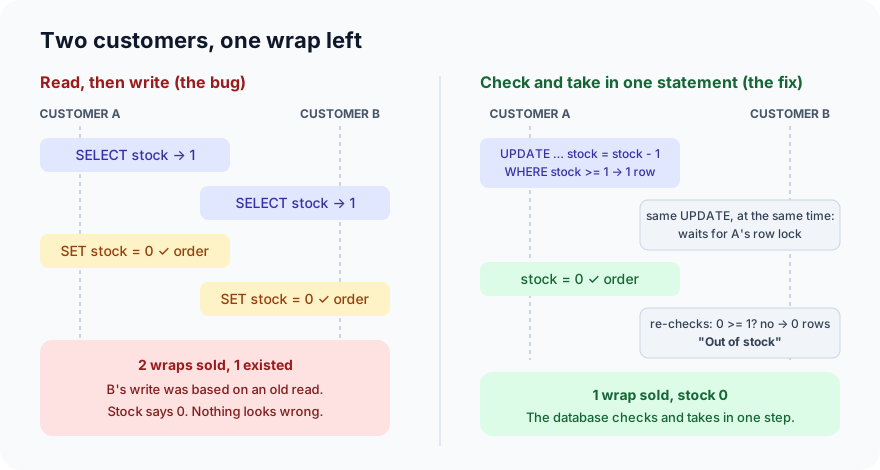
None of the single-user tests in Step 4 can find this. A manual tester clicking Pay can't find it either. It only shows up with many requests at once: at lunchtime, or when a page retries a slow request.
The fix, and one that doesn't work
We tried wrapping the old code in a transaction first. That alone doesn't fix the race: we ran it five times and got 20 orders accepted and 9 left every time. With PostgreSQL's default isolation level, Read Committed, two transactions can still both read 10 before either writes.
What fixes both bugs is two changes:
def place_order(conn, customer, items, tip=0):
    """items is {menu_item_id: quantity}. Returns the new order id."""
    with conn.transaction():  # all of it, or none of it
        total = tip
        for item_id, qty in items.items():
            price = conn.execute(
                "SELECT price FROM menu_items WHERE id = %s", (item_id,)
            ).fetchone()[0]
            total += price * qty

        order_id = conn.execute(
            "INSERT INTO orders (customer, tip, total) VALUES (%s, %s, %s) RETURNING id",
            (customer, tip, total),
        ).fetchone()[0]

        for item_id, qty in items.items():
            # Check and take the stock in one statement, so no one can sneak in between.
            taken = conn.execute(
                "UPDATE menu_items SET stock = stock - %s "
                "WHERE id = %s AND stock >= %s RETURNING stock",
                (qty, item_id, qty),
            ).fetchone()
            if taken is None:
                raise OutOfStock(f"item {item_id}: not enough left for {qty}")
            conn.execute(
                "INSERT INTO order_items (order_id, item_id, qty) VALUES (%s, %s, %s)",
                (order_id, item_id, qty),
            )
    return order_id
with conn.transaction():makes the whole order one unit. IfOutOfStockis raised, psycopg rolls everything back: the order row, the lines, the stock. That fixes bug 1.- One
UPDATEthat checks and takes the stock.stock = stock - 1 WHERE stock >= 1lets the database do the arithmetic on the current value. When two customers run it at once, PostgreSQL makes the second wait until the first is finished, then checks theWHEREagain on the new value. If nothing is left, no row matches,RETURNINGreturns nothing, and the code raisesOutOfStock. That fixes bug 2. (SELECT ... FOR UPDATEbefore the read also works. It locks the row while you decide.)
$ python -m pytest tests
============================= test session starts ==============================
platform linux -- Python 3.11.17, pytest-9.2.0, pluggy-1.7.0
rootdir: ~/foodnow-db
collected 8 items

tests/test_concurrency.py .                                              [ 12%]
tests/test_migrations.py ..                                              [ 37%]
tests/test_orders.py ...                                                 [ 75%]
tests/test_schema.py ..                                                  [100%]

============================== 8 passed in 0.45s ===============================
We ran the fixed suite 10 times: 8 passed every time. And the 20-customer race, run 5 more times on its own: exactly 10 accepted, 10 sold, 0 left, every time.
A race test that passes once proves little, because races depend on timing. Run it many times, for example for i in $(seq 20); do python -m pytest -q tests/test_concurrency.py; done, and keep it in your suite, where it runs on every change.
Step 7: Test the constraints too
The CHECK rules in the schema are the last line of defence: they protect the data even when some other code, a script or a person in a SQL console, skips the rules in your Python. They are worth two lines of test each, because a migration can quietly drop them.
import psycopg
import pytest


def test_database_refuses_a_tip_over_200(db):
    with pytest.raises(psycopg.errors.CheckViolation):
        db.execute("INSERT INTO orders (customer, tip, total) VALUES ('asha', 250, 750)")


def test_database_refuses_negative_stock(db):
    with pytest.raises(psycopg.errors.CheckViolation):
        db.execute("UPDATE menu_items SET stock = -1 WHERE id = 1")
Step 8: The migration that only fails on real data
FoodNow adds a delivery fee. The migration, migrations/002_delivery_fee.sql, is one line:
ALTER TABLE orders ADD COLUMN delivery_fee integer NOT NULL;
The developer runs it on their test database, which is empty, and it works. Production has a year of orders. Two tests, one for each case:
import pathlib

MIGRATION = (pathlib.Path(__file__).parent.parent / "migrations/002_delivery_fee.sql").read_text()


def test_migration_on_an_empty_database(db):
    db.execute(MIGRATION)


def test_migration_on_a_database_that_already_has_orders(db):
    db.execute("INSERT INTO orders (customer, tip, total) VALUES ('asha', 50, 550)")

    db.execute(MIGRATION)

    row = db.execute("SELECT customer, total, delivery_fee FROM orders").fetchone()
    assert row == ("asha", 550, 0)
tests/test_migrations.py .F                                              [100%]

=================================== FAILURES ===================================
_____________ test_migration_on_a_database_that_already_has_orders _____________
tests/test_migrations.py:13: in test_migration_on_a_database_that_already_has_orders
    db.execute(MIGRATION)
.../site-packages/psycopg/connection.py:304: in execute
    raise ex.with_traceback(None)
E   psycopg.errors.NotNullViolation: column "delivery_fee" of relation "orders" contains null values
=========================== short test summary info ============================
FAILED tests/test_migrations.py::test_migration_on_a_database_that_already_has_orders
========================= 1 failed, 1 passed in 0.12s ==========================
(We shortened the long path to the installed psycopg package to .../site-packages.)
On an empty table it passes. With one existing order it fails, because the old rows would get NULL in a column that doesn't allow it. In production, that's a failed release in the middle of a deploy. The fix is to give old rows a value:
ALTER TABLE orders ADD COLUMN delivery_fee integer NOT NULL DEFAULT 0;
Both tests pass. Since PostgreSQL 11, adding a column with a fixed default like this doesn't rewrite the whole table, so it's quick even on a big one.
Test every migration on data shaped like production: existing rows, NULLs in optional columns, old values that today's code would never write. The strongest version is a nightly job that runs the new migrations on a recent anonymised copy of production.
Common mistakes
- Checking only the return value. The function's answer and the database's contents can disagree, as Step 5 shows. After a write, query the rows. After a failure, query them too.
- Mocking the database in these tests. A mock returns what you told it to. It has no transactions, no locks and no constraints, which is where all three bugs here lived. Mocks have their place, but not in a test whose job is to check the database.
- Tests that share data. Shared rows make tests pass or fail depending on order. Give each test a fresh schema, or a transaction that is rolled back.
- Testing concurrency by hand. Two people can't click at exactly the same moment. Threads with a barrier, as in Step 6, can, and they do it on every run.
- Testing migrations only on an empty database. Empty tables accept almost any migration. Real tables are where they fail.
What's next
In Part 5 of Testing in Practice we look at test doubles: mocks, stubs, fakes and spies, what each one is for, and how a mock can let a real bug through.
ProvaLab's pytest plugin sends every result from tests like these to the ProvaLab test management system, with the history of each test across runs. So a race test that fails once in fifty runs shows up as a pattern you can look at, not a one-off you forget. See it in the two-minute product tour.
See ProvaLab working on a real app
Your coding agent runs the tests, reads the failures and fixes them.