Testing in Practice · Part 12
Your first Cypress test (hands-on): retrying assertions, cy.intercept, and a test that passed too early
ProvaLab team · · 13 min read
Part 11 tested the FoodNow order page with Selenium, and two problems got in the way before the test reached the app: a cookie banner over the button, and a total read before the page had worked it out. Cypress was built to make that second kind of problem go away. It runs inside the browser, next to your app, and its commands and assertions retry by themselves until they pass or time out.
This post writes a first Cypress test for the same page. This time the total comes from a price API, which lets us use Cypress's best feature, cy.intercept, to make the network fail and answer out of order. The page has three bugs, and two of them are only reachable that way. And one of our own tests passed on the buggy page. Every command and line of output below was run while writing this post, with Cypress 15.21.1.
How Cypress is different
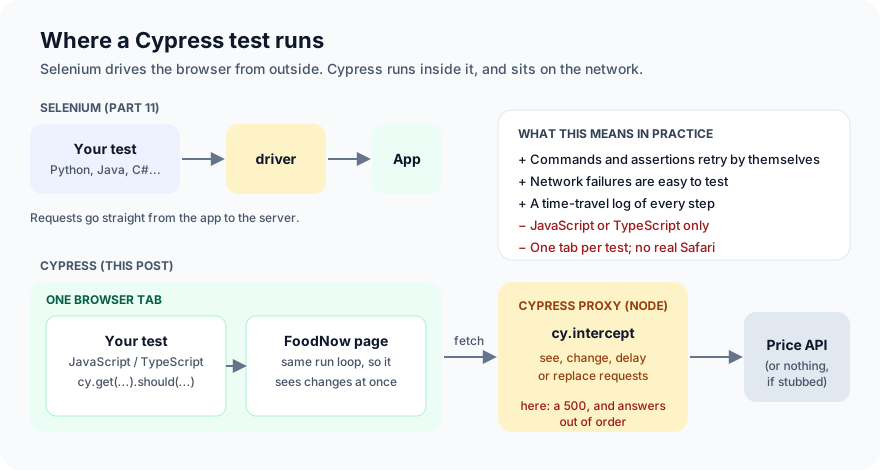
- The test runs in the browser, in the same tab as your app. It sees changes the moment they happen, and you can step back through every command in Cypress's log.
- Commands queue and retry.
cy.get("#total").should("have.text", "₹220")keeps looking for 4 seconds by default, until the text matches. - Cypress sits on the network. Its proxy sees every request the app makes, and
cy.interceptcan watch, delay, change or replace any of them. - The costs: tests are JavaScript or TypeScript only, each test runs in one browser tab, and Safari is only available through an experimental WebKit option.
Step 1: Set up
You need Node.js 20 or newer:
mkdir foodnow-cypress && cd foodnow-cypress
npm init -y
npm install --save-dev [email protected]
mkdir -p site cypress/e2e
The first install downloads the Cypress app (a few hundred MB) into your home folder. npx cypress verify checks that it can run:
$ npx cypress verify
✔  Verified Cypress!       /home/test/.cache/Cypress/15.21.1/Cypress
Step 2: The page and a small server
The order page is the one from Part 11, with one change: the total now comes from a price API. Here's the part of site/index.html that changed:
  function render() {
    // ...draws the basket lines, each with a Remove button:
    //   row.querySelector("button").onclick = () => { cart.splice(i + 1, 1); render(); };

    // The total comes from the price service (prices, offers, delivery).
    document.getElementById("total").textContent = "…";
    const names = cart.map(x => x.name).join(",");
    fetch(`/api/price?items=${encodeURIComponent(names)}`)
      .then(r => r.json())
      .then(data => { document.getElementById("total").textContent = `₹${data.total}`; });
  }
Yes, the Remove bug from Part 11 is still there. We left it in so you can compare how the two tools report it.
And server.js, which serves the page and a price API that answers after 800 ms:
// A tiny FoodNow server: the order page, and a price API that answers after 800 ms.
const http = require("http");
const fs = require("fs");
const path = require("path");

const PRICES = { "Paneer wrap": 180, "Masala chai": 40, "Veg biryani": 260 };
const DELIVERY = 40, FREE_FROM = 500;

http.createServer((req, res) => {
  const url = new URL(req.url, "http://localhost");
  if (url.pathname === "/api/price") {
    const items = (url.searchParams.get("items") || "").split(",").filter(Boolean);
    const food = items.reduce((s, name) => s + PRICES[name], 0);
    const total = food === 0 ? 0 : food + (food >= FREE_FROM ? 0 : DELIVERY);
    setTimeout(() => {
      res.writeHead(200, { "Content-Type": "application/json" });
      res.end(JSON.stringify({ food, total }));
    }, 800);
    return;
  }
  if (url.pathname === "/") {
    res.writeHead(200, { "Content-Type": "text/html; charset=utf-8" });
    res.end(fs.readFileSync(path.join(__dirname, "site", "index.html")));
    return;
  }
  res.writeHead(404);
  res.end();
}).listen(process.env.PORT || 8090, () => console.log("FoodNow on http://localhost:" + (process.env.PORT || 8090)));
Start it in a second terminal with node server.js, and tell Cypress where it is in cypress.config.js:
const { defineConfig } = require("cypress");

module.exports = defineConfig({
  e2e: {
    baseUrl: "http://localhost:8090",
    supportFile: false,
    viewportWidth: 1280,
    viewportHeight: 800,
  },
});
Step 3: The first test
Save this as cypress/e2e/first.cy.js:
describe("FoodNow order", () => {
  it("adds a wrap", () => {
    cy.visit("/");
    cy.get("[data-testid=add-wrap]").click();
    cy.get("#total").should("have.text", "₹220"); // ₹180 + ₹40 delivery
  });
});
Run it headless with npx cypress run, or open the interactive runner with npx cypress open to watch it:
$ npx cypress run --spec cypress/e2e/first.cy.js
  FoodNow order
    1) adds a wrap

  0 passing (5s)
  1 failing

  1) FoodNow order
       adds a wrap:
     CypressError: Timed out retrying after 4050ms: `cy.click()` failed because this element:

`<button data-testid="add-wrap" data-name="Paneer wrap" data-price="180">Add</button>`

is being covered by another element:

`<div id="cookies">...</div>`

Fix this problem, or use {force: true} to disable error checking.
The same cookie banner that stopped Selenium. The difference is that Cypress retried for 4 seconds first, in case the banner went away by itself, and then said exactly what was in the way. It also suggests {force: true}. Don't take that suggestion here: forcing a click through a banner is something no customer can do. Close it as they would:
    cy.visit("/");
    cy.get("#accept").click(); // close the cookie banner first
    cy.get("[data-testid=add-wrap]").click();
    cy.get("#total").should("have.text", "₹220"); // ₹180 + ₹40 delivery
  FoodNow order
    ✓ adds a wrap (1020ms)
And here's the second difference from Selenium: no wait code at all. The total showed "…" for 800 ms, and should("have.text", "₹220") simply kept checking until it changed. The test took 1,020 ms, most of it waiting for the price API.
Step 4: The mistake every Cypress beginner makes
Cypress commands look like ordinary function calls, but they don't run when that line runs. They're queued and run later, one after another. So this, which looks perfectly reasonable, can't work:
  it("adds a wrap (the way that doesn't work)", () => {
    cy.visit("/");
    cy.get("#accept").click();
    cy.get("[data-testid=add-wrap]").click();
    const total = cy.get("#total").invoke("text");
    expect(total).to.equal("₹220");
  });
  1) FoodNow order
       adds a wrap (the way that doesn't work):
      AssertionError: expected { Object (specWindow, chainerId) } to equal '₹220'
total isn't the text. It's a Cypress chainer, a handle to a command that hasn't run yet. The fix that people reach for next is .then():
    cy.get("#total").invoke("text").then((text) => {
      expect(text).to.equal("₹220");
    });
  2) reading a value with .then()
      AssertionError: expected '…' to equal '₹220'
Now it gets the text, but only once, without retrying: .then() runs as soon as the command before it finishes, and the price hadn't arrived. Use .should() for anything you check, because only .should() retries. Keep .then() for when you need a value to do something with, not to assert on.
Step 5: The real tests
Save this as cypress/e2e/order.cy.js:
describe("FoodNow order", () => {
  beforeEach(() => {
    cy.visit("/");
    cy.get("#accept").click();
  });

  it("charges delivery on a small order", () => {
    cy.get("[data-testid=add-wrap]").click();
    cy.get("#total").should("have.text", "₹220");
  });

  it("gives free delivery from ₹500", () => {
    cy.get("[data-testid=add-biryani]").click();
    cy.get("[data-testid=add-biryani]").click();
    cy.get("#total").should("have.text", "₹520");
  });

  it("removes the item you remove", () => {
    cy.get("[data-testid=add-wrap]").click();
    cy.get("[data-testid=add-chai]").click();
    cy.contains("[data-testid=cart-line]", "Paneer wrap").find("button").click();
    cy.get("[data-testid=cart-line] span").should("have.length", 1).and("have.text", "Masala chai");
    cy.get("#total").should("have.text", "₹80");
  });

  it("won't place an empty order", () => {
    cy.get("#place").click();
    cy.get("#status").should("have.text", "Your basket is empty");
  });
});
cy.contains(selector, text) finds the basket line that contains "Paneer wrap", so we click its Remove button, not just the first one on the page.
Step 6: Make the network misbehave with cy.intercept
Real price services fail, and answer slowly, and answer in a different order from the one you asked in. Testing that against a real server is hard. With cy.intercept, it's a few lines. Add this to order.cy.js:
describe("when the price service misbehaves", () => {
  beforeEach(() => {
    cy.visit("/");
    cy.get("#accept").click();
  });

  it("says so when the price service is down", () => {
    cy.intercept("GET", "/api/price*", { statusCode: 500, body: { error: "price service down" } }).as("price");
    cy.get("[data-testid=add-wrap]").click();
    cy.wait("@price");
    cy.get("#total").should("contain.text", "couldn't work out your total");
  });

  it("shows the total for the latest basket when answers arrive out of order", () => {
    // Answer 1 (wrap only) arrives late; answer 2 (wrap + chai) arrives first.
    const answers = [
      { body: { food: 180, total: 220 }, delay: 1500 },
      { body: { food: 220, total: 260 }, delay: 100 },
    ];
    cy.intercept("GET", "/api/price*", (req) => req.reply(answers.shift())).as("price");
    cy.get("[data-testid=add-wrap]").click();
    cy.get("[data-testid=add-chai]").click();
    cy.wait(["@price", "@price"]); // both answers have been sent to the page
    cy.get("#total").should("have.text", "₹260");
  });
});
- The first test replaces the price API's answer with an error, as if the service were down. We expect the page to say it couldn't work out the total.
- The second plays out a real race. The customer adds a wrap, then a chai. Two price requests go out. The answer for "wrap only" is slow and arrives after the answer for "wrap and chai". The page should still show ₹260, the total for what's actually in the basket.
.as("price")names the intercepted request, andcy.wait("@price")waits for it.
Step 7: Run it
$ npx cypress run --spec cypress/e2e/order.cy.js
  FoodNow order
    ✓ charges delivery on a small order (1020ms)
    ✓ gives free delivery from ₹500 (1048ms)
    1) removes the item you remove
    ✓ won't place an empty order (187ms)

  when the price service misbehaves
    2) says so when the price service is down
    ✓ shows the total for the latest basket when answers arrive out of order (1660ms)

  4 passing (13s)
  2 failing
Two bugs, and one test we'll come back to:
  1) FoodNow order
       removes the item you remove:
      Timed out retrying after 4000ms
      + expected - actual
      -'Paneer wrap'
      +'Masala chai'

  2) when the price service misbehaves
       says so when the price service is down:
      Timed out retrying after 4000ms
      + expected - actual
      -'₹undefined'
      +'couldn\'t work out your total'
- Remove removes the wrong item, the same bug Selenium found:
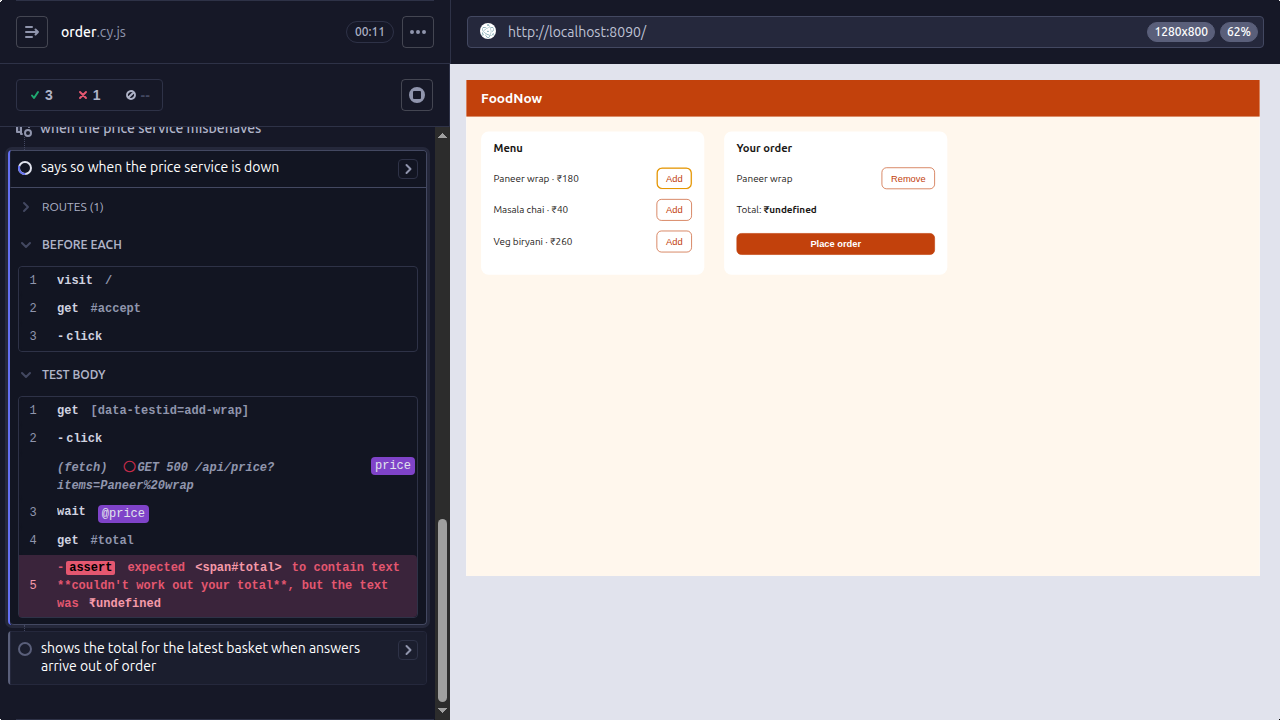
cart.splice(i + 1, 1). - When the price service is down, the customer sees "Total: ₹undefined". The page never checks whether the request worked. It reads the error's JSON as if it were a price, finds no
total, and printsundefined. And the Place order button still works.
Cypress takes a screenshot of every failure in cypress run mode, with its command log beside the page:
Step 8: The test that passed too early
Look again at the run: the out-of-order test passed, in 1,660 ms. But the page has no protection against out-of-order answers at all: whichever answer arrives last wins. So how did it pass?
We ran exactly the same test on the same buggy page eight times. It failed six times, with -'₹220' +'₹260', and passed twice. A flaky test, on a page with a real bug.
The test does wait for both answers. We measured that: cy.wait("@price") on a reply delayed by 2,000 ms finished after 2,058 ms. But cy.wait finishes the moment the reply is sent to the page. The page updates the total a few milliseconds later. In that gap, the total still shows ₹260 from the fast answer, and should("have.text", "₹260") sees it and passes at once. Whether the test passes depends on a few milliseconds.
The deeper problem: a retrying assertion checks whether something becomes true. This test needs to check that something stays true after the late answer lands, and there's nothing to retry towards.
When there's no event that means "the page has finished reacting", a short, explained pause is the honest tool:
    cy.wait(["@price", "@price"]); // both answers have been sent to the page
    // We're checking that the total *stays* right after the late answer lands.
    // Retrying assertions can't wait for "nothing changes", so give the page a moment.
    cy.wait(300);
    cy.get("#total").should("have.text", "₹260");
With that, the test failed on the buggy page 5 times out of 5, and passed on the fixed page 5 times out of 5:
  3) when the price service misbehaves
       shows the total for the latest basket when answers arrive out of order:
      Timed out retrying after 4000ms
      + expected - actual
      -'₹220'
      +'₹260'
The customer has a wrap and a chai in the basket, and the page says ₹220, the price of the wrap alone.
Normally, cy.wait(300) with a number is a mistake, the Cypress version of time.sleep. Here it's the exception, because there's nothing else to wait for, and the comment says why. If you can, add something to the app that tests can wait for instead, such as a data-loading attribute that's removed when the last price has been applied.
Step 9: Fix the page
Three changes to render():
   const cart = [];
+  let latestRequest = 0;
...
-      row.querySelector("button").onclick = () => { cart.splice(i + 1, 1); render(); };
+      row.querySelector("button").onclick = () => { cart.splice(i, 1); render(); };
...
+    const request = ++latestRequest;
     fetch(`/api/price?items=${encodeURIComponent(names)}`)
-      .then(r => r.json())
-      .then(data => { document.getElementById("total").textContent = `₹${data.total}`; });
+      .then(r => { if (!r.ok) throw new Error(`price service: ${r.status}`); return r.json(); })
+      .then(data => {
+        if (request !== latestRequest) return; // an older answer: the basket has changed since
+        document.getElementById("total").textContent = `₹${data.total}`;
+      })
+      .catch(() => {
+        if (request !== latestRequest) return;
+        document.getElementById("total").textContent = "We couldn't work out your total. Please try again.";
+      });
- Remove the item that was clicked.
- Treat a failed request as a failure, and tell the customer.
- Number each request, and ignore any answer that isn't for the latest basket.
$ npx cypress run --spec cypress/e2e/order.cy.js
  FoodNow order
    ✓ charges delivery on a small order (1025ms)
    ✓ gives free delivery from ₹500 (1027ms)
    ✓ removes the item you remove (1093ms)
    ✓ won't place an empty order (186ms)

  when the price service misbehaves
    ✓ says so when the price service is down (187ms)
    ✓ shows the total for the latest basket when answers arrive out of order (1953ms)

  6 passing (6s)
We ran it five times on the fixed page: 6 passing every time. The two network tests that use stubs are also the fastest, because they don't wait for the real 800 ms server.
Selenium, Playwright or Cypress?
| Selenium | Playwright | Cypress | |
|---|---|---|---|
| Runs | Outside the browser, through a driver | Outside, over its own protocol | Inside the browser |
| Waiting | You write explicit waits | Built in | Built in (.should() retries) |
| Faking the network | Not built in | page.route() |
cy.intercept() |
| Languages | Java, Python, C#, JavaScript, Ruby | JS/TS, Python, Java, C# | JavaScript, TypeScript |
| Browsers | Chrome, Firefox, Safari, Edge | Chromium, Firefox, WebKit | Chrome-family, Firefox, Electron; WebKit experimental |
| Multiple tabs / origins | Yes | Yes | One tab; other origins need cy.origin() |
Choose Cypress when your team writes JavaScript, tests mostly one web app, and wants the friendliest runner to write and debug tests in. Choose Playwright for more browsers and languages and multi-tab flows. Keep Selenium for existing suites, real Safari, and device clouds built around WebDriver. All three found the Remove bug. What found the other two was the decision to test what happens when the network misbehaves.
Common mistakes
- Treating commands as values.
const t = cy.get(...)is a chainer, not an element or its text. Chain.should()instead. - Asserting inside
.then(). It doesn't retry. Use.should(). {force: true}to get past overlays. It clicks through things users can't. Close the overlay.- Numeric
cy.wait(ms)everywhere. Wait for an alias (cy.wait("@price")) or an assertion. Use a number only when nothing else will do, and say why in a comment. - Testing only the happy network.
cy.interceptmakes errors, slow answers and out-of-order answers cheap to test. Two of our three bugs were there. - Trusting a pass you didn't expect. Our race test passed on a page with no race protection. When a test passes and you can't say why the code is right, find out.
What's next
In Part 13 of Testing in Practice we look at test estimation: how long will testing take, how to estimate it from the work rather than guess, and how to explain the number to people who wanted it smaller.
ProvaLab's QA Infrastructure runs browser tests in the cloud with a live view while they run, and ProvaLab's plugins for Cypress, Playwright and pytest send each result to the ProvaLab test management system, with screenshots and each test's history across runs. A test that passes one run and fails the next, like the race test in Step 8, shows both results in its history instead of being lost in a CI log. See it in the two-minute product tour.
See ProvaLab working on a real app
Your coding agent runs the tests, reads the failures and fixes them.