Testing in Practice · Part 8
BDD with pytest-bdd (hands-on): Given/When/Then, and the question that wasn't a bug
ProvaLab team · · 13 min read
Most bugs aren't typing mistakes. They're two people who understood one sentence in two different ways. "Delivery is free on orders of ₹500 or more" sounds clear, until someone asks: ₹500 before the discount, or after?
Behaviour-driven development (BDD) is a way of finding those questions before the code is written. The product owner, a developer and a tester talk through concrete examples of how a feature should behave. They write the examples down in plain language, as Given / When / Then scenarios. Then the scenarios are automated, so they run as tests every time the code changes.
This post explains BDD and the Gherkin language. Then it applies them to FoodNow's checkout pricing with pytest-bdd. The code has two planted bugs. The scenarios also found a rule that nobody had agreed on, and we hit two traps in the tooling. Every command and line of output below was run while writing this post.
What BDD is, and what it isn't
BDD grew out of test-driven development in the mid-2000s. Dan North coined the name, and the Given/When/Then format came with it. The core idea is that you describe behaviour with examples, not abstract rules, because examples expose the gaps in a rule.
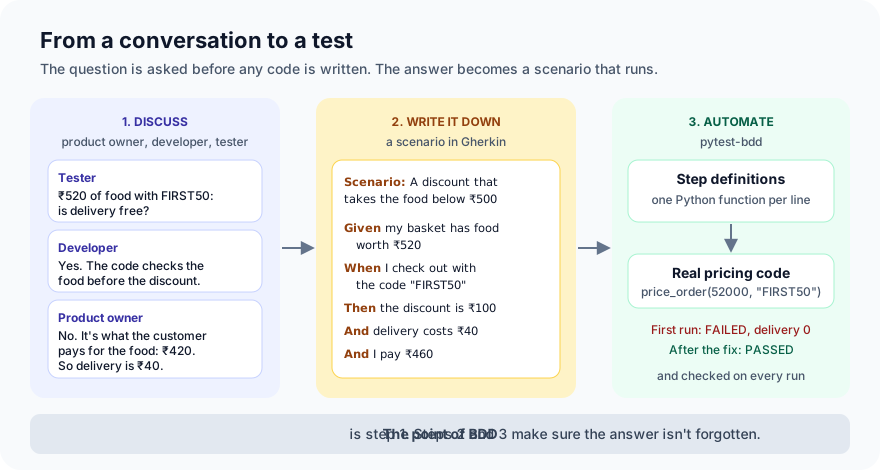
The usual way to start is a short meeting, often called the three amigos: someone who knows what the business wants (the product owner), someone who'll build it (a developer), and someone who thinks about how it could go wrong (a tester). They take one story and ask "can you give me an example?" until the rules are clear.
BDD is not the tool. Writing tests in Gherkin without the conversation gives you slower, wordier tests and none of the benefit. If only developers ever read the feature files, plain pytest is usually the better choice.
Gherkin in five keywords
Gherkin is the language the scenarios are written in. Cucumber made it popular, and pytest-bdd, Behave, SpecFlow and many others read it. A feature file looks like this:
Feature: Checkout pricing

  Scenario: Delivery is charged on a small order
    Given my basket has food worth ₹300
    When I check out
    Then delivery costs ₹40
    And I pay ₹340
| Keyword | Meaning |
|---|---|
| Feature | The thing being described. One per file. |
| Scenario | One concrete example. |
| Given | The situation before the action. |
| When | The action the user takes. |
| Then | What should happen. |
| And, But | More of the line before. |
| Scenario Outline + Examples | The same scenario with a table of values, one test per row. |
Each line is a step. In the test code, every step is matched to a Python function, its step definition.
Step 1: Set up
You need Python 3.10 or newer:
mkdir foodnow-bdd && cd foodnow-bdd
python -m venv .venv && source .venv/bin/activate
pip install pytest==9.2.0 pytest-bdd==9.0.1
mkdir -p foodnow tests/features
touch foodnow/__init__.py
printf '[pytest]\npythonpath = .\n' > pytest.ini
pytest-bdd installs the parse library (1.22.4 here), which we use in Step 4.
Step 2: The pricing code, with two bugs
The rules from the product owner: delivery costs ₹40, and it's free from ₹500. The code FIRST50 takes 50% off the food, up to ₹100. Save this as foodnow/pricing.py:
"""FoodNow checkout pricing. All money is in paise (₹1 = 100 paise)."""
from dataclasses import dataclass

DELIVERY_FEE = 4000          # ₹40
FREE_DELIVERY_FROM = 50000   # ₹500
PROMOS = {"FIRST50": {"percent": 50, "cap": 10000}}  # 50% off, up to ₹100


class InvalidPromo(Exception):
    pass


@dataclass
class Bill:
    food: int
    discount: int
    delivery: int

    @property
    def total(self) -> int:
        return self.food - self.discount + self.delivery


def price_order(food: int, promo: str | None = None) -> Bill:
    discount = 0
    if promo is not None:
        if promo not in PROMOS:
            raise InvalidPromo(f"{promo} is not a valid code")
        rule = PROMOS[promo]
        discount = food * rule["percent"] // 100
    delivery = 0 if food > FREE_DELIVERY_FROM else DELIVERY_FEE
    return Bill(food, discount, delivery)
Two bugs are planted: > should be >=, and the ₹100 cap is never applied. Both are the kind of thing that happens when a rule is read quickly.
Step 3: The scenarios
These are the examples the three amigos agreed on. Save them as tests/features/checkout_pricing.feature:
Feature: Checkout pricing
  As a hungry customer
  I want to know exactly what I'll pay before I pay
  So that there are no surprises at the door

  Rules agreed with the product owner:
  - Delivery costs ₹40. It is free when the food comes to ₹500 or more.
  - The code FIRST50 takes 50% off the food, up to ₹100.

  Scenario: Delivery is charged on a small order
    Given my basket has food worth ₹300
    When I check out
    Then delivery costs ₹40
    And I pay ₹340

  Scenario Outline: Free delivery from ₹500
    Given my basket has food worth ₹<food>
    When I check out
    Then delivery costs ₹<delivery>

    Examples:
      | food | delivery |
      | 499  | 40       |
      | 500  | 0        |
      | 501  | 0        |

  Scenario: FIRST50 takes half off a small order
    Given my basket has food worth ₹120
    When I check out with the code "FIRST50"
    Then the discount is ₹60
    And I pay ₹100

  Scenario: FIRST50 is capped at ₹100
    Given my basket has food worth ₹400
    When I check out with the code "FIRST50"
    Then the discount is ₹100
    And I pay ₹340

  Scenario: An unknown code is refused
    Given my basket has food worth ₹300
    When I check out with the code "FREEFOOD"
    Then I see the message "FREEFOOD is not a valid code"
The text under Feature: is free text. pytest-bdd ignores it, but people read it, so it's a good place for the rules. The examples table tests both sides of ₹500 and the value itself, the boundary values where bugs live. A ₹400 basket is where the 50% discount (₹200) is more than the cap, so that's the example that checks the cap.
Notice what isn't in the scenarios: buttons, pages and clicks. "When I check out" says what the customer does, not how. That keeps the scenarios readable, and they don't break when the screen changes.
Step 4: The step definitions
Each step line needs a Python function. Save this as tests/test_checkout_pricing.py:
from parse import with_pattern
from pytest_bdd import given, parsers, scenarios, then, when

from foodnow.pricing import InvalidPromo, price_order

scenarios("features/checkout_pricing.feature")


@with_pattern(r"\d[\d,]*")
def rupees(text: str) -> int:
    """'₹1,200' in a scenario becomes 120000 paise in the test."""
    return int(text.replace(",", "")) * 100


def step(text):
    return parsers.parse(text, extra_types={"Rupees": rupees})


@given(step("my basket has food worth ₹{food:Rupees}"), target_fixture="basket")
def basket(food):
    return {"food": food}


@when("I check out", target_fixture="result")
def check_out(basket):
    return price_order(basket["food"])


@when(step('I check out with the code "{code}"'), target_fixture="result")
def check_out_with_code(basket, code):
    try:
        return price_order(basket["food"], promo=code)
    except InvalidPromo as e:
        return e


@then(step("delivery costs ₹{amount:Rupees}"))
def delivery_costs(result, amount):
    assert result.delivery == amount


@then(step("the discount is ₹{amount:Rupees}"))
def discount_is(result, amount):
    assert result.discount == amount


@then(step("I pay ₹{amount:Rupees}"))
def i_pay(result, amount):
    assert result.total == amount


@then(step('I see the message "{message}"'))
def i_see(result, message):
    assert isinstance(result, InvalidPromo)
    assert str(result) == message
How it fits together:
scenarios(...)turns every scenario in the feature file into a pytest test.{food:Rupees}pulls the amount out of the step text and converts it withrupees(). The scenarios talk in rupees, as people do. The code works in paise. Step 6 explains why this is a custom type rather than the usual{food:d}.target_fixture="basket"makes the step's return value available as a fixture calledbasket, which later steps ask for. That's how a Given passes its data to the When, and the When to the Then.- One step definition serves every scenario that uses that line. "I pay ₹{amount}" is written once and used in four scenarios.
Step 5: Run it
--gherkin-terminal-reporter prints the scenarios instead of test names, and -vv adds the steps:
$ pytest --gherkin-terminal-reporter -vv --tb=no -k "capped or 500-0"
collecting ... collected 7 items / 5 deselected / 2 selected

tests/test_checkout_pricing.py::test_free_delivery_from_500[500-0]
Feature: Checkout pricing
    Scenario Outline: Free delivery from ₹500
        Given my basket has food worth ₹500
        When I check out
        Then delivery costs ₹0
    FAILED


tests/test_checkout_pricing.py::test_first50_is_capped_at_100
Feature: Checkout pricing
    Scenario: FIRST50 is capped at ₹100
        Given my basket has food worth ₹400
        When I check out with the code "FIRST50"
        Then the discount is ₹100
        And I pay ₹340
    FAILED


=========================== short test summary info ============================
FAILED tests/test_checkout_pricing.py::test_free_delivery_from_500[500-0] - assert 4000 == 0
 +  where 4000 = Bill(food=50000, discount=0, delivery=4000).delivery
FAILED tests/test_checkout_pricing.py::test_first50_is_capped_at_100 - assert 20000 == 10000
 +  where 20000 = Bill(food=40000, discount=20000, delivery=4000).discount
======================= 2 failed, 5 deselected in 0.02s ========================
Without -k, the full run is 2 failed, 5 passed. Both planted bugs, and the output is something the product owner can read: "₹500 of food, delivery should cost ₹0, it failed." The ₹499 and ₹501 rows passed, so only the exact boundary was wrong.
The fix:
-        discount = food * rule["percent"] // 100
-    delivery = 0 if food > FREE_DELIVERY_FROM else DELIVERY_FEE
+        discount = min(food * rule["percent"] // 100, rule["cap"])
+    delivery = 0 if food >= FREE_DELIVERY_FROM else DELIVERY_FEE
$ pytest -q
.......                                                                  [100%]
7 passed in 0.03s
Step 6: The product owner writes "₹1,200"
Scenarios are meant to be written and read by people who don't code. So the product owner adds one:
  Scenario: A big order gets free delivery
    Given my basket has food worth ₹1,200
    When I check out
    Then delivery costs ₹0
    And I pay ₹1,200
Our first step definitions used the usual {food:d}, which matches digits only. The comma doesn't match:
E   pytest_bdd.exceptions.StepDefinitionNotFoundError: Step definition is not found: Given "my basket has food worth ₹1,200". Line 45 in scenario "A big order gets free delivery" in the feature ".../tests/features/checkout_pricing.feature"
1 failed, 7 passed in 0.02s
This failure is loud, which is good. The wrong fix is to ask the product owner to write "1200". The right fix is to make the steps accept the way people write money. That's the Rupees type in Step 4: it allows commas and converts to paise in one place. With it, all 8 pass. When a scenario and a step definition disagree, the scenario is usually the one that's right, because it's in the language of the people who own the rule.
Step 7: The question that wasn't a bug
Back to the three amigos. Picture this exchange: the tester asks, "₹520 of food with FIRST50. The discount is ₹100, so the customer pays ₹420 for the food. Is delivery free?"
The developer says yes: the code checks the food total, ₹520, before the discount. The product owner says no: free delivery is for orders where the customer pays ₹500 or more for food. Both had read the same rule. Neither was careless. The rule was ambiguous, and nobody noticed until someone asked for an example.
The product owner's answer becomes a scenario:
  Scenario: A discount that takes the food below ₹500
    Given my basket has food worth ₹520
    When I check out with the code "FIRST50"
    Then the discount is ₹100
    And delivery costs ₹40
    And I pay ₹460
$ pytest --gherkin-terminal-reporter -vv --tb=no -k below
collecting ... collected 9 items / 8 deselected / 1 selected

tests/test_checkout_pricing.py::test_a_discount_that_takes_the_food_below_500
Feature: Checkout pricing
    Scenario: A discount that takes the food below ₹500
        Given my basket has food worth ₹520
        When I check out with the code "FIRST50"
        Then the discount is ₹100
        And delivery costs ₹40
        And I pay ₹460
    FAILED


=========================== short test summary info ============================
FAILED tests/test_checkout_pricing.py::test_a_discount_that_takes_the_food_below_500 - assert 0 == 4000
 +  where 0 = Bill(food=52000, discount=10000, delivery=0).delivery
======================= 1 failed, 8 deselected in 0.01s ========================
The code did what the developer understood. It wasn't a bug in the code. It was a gap in the rule, and BDD is mainly a tool for finding those. One line changes:
-    delivery = 0 if food >= FREE_DELIVERY_FROM else DELIVERY_FEE
+    delivery = 0 if food - discount >= FREE_DELIVERY_FROM else DELIVERY_FEE
And the rule at the top of the feature file is updated, so the next person doesn't have the same argument:
  - Delivery costs ₹40. It is free when the food, after any discount,
    comes to ₹500 or more.
$ pytest --gherkin-terminal-reporter -v --cucumberjson=cucumber.json
...
tests/test_checkout_pricing.py::test_a_big_order_gets_free_delivery
Feature: Checkout pricing
    Scenario: A big order gets free delivery PASSED

tests/test_checkout_pricing.py::test_a_discount_that_takes_the_food_below_500
Feature: Checkout pricing
    Scenario: A discount that takes the food below ₹500 PASSED

- generated json file: ~/foodnow-bdd/cucumber.json -
============================== 9 passed in 0.02s ===============================
--cucumberjson writes the results in Cucumber's JSON format, with each step and its status. Many reporting tools can read it and show the scenarios as a readable report, sometimes called living documentation: a description of the system that's checked against the code on every run, so it can't quietly go out of date.
Step 8: The scenario that never ran
pytest-bdd has two ways to turn scenarios into tests. scenarios("file.feature"), used above, binds every scenario in the file. The other way binds them one at a time:
from pytest_bdd import scenario

FEATURE = "features/checkout_pricing.feature"


@scenario(FEATURE, "Delivery is charged on a small order")
def test_small_order():
    pass


@scenario(FEATURE, "FIRST50 is capped at ₹100")
def test_first50_cap():
    pass
Teams sometimes do this to give tests their own names. We copied the feature file, with all seven scenarios, next to a test file bound this way, and ran it on the pricing code from Step 5, before the after-discount fix:
$ pytest trap -v
collecting ... collected 2 items

trap/test_pricing_bound_one_by_one.py::test_small_order PASSED           [ 50%]
trap/test_pricing_bound_one_by_one.py::test_first50_cap PASSED           [100%]

============================== 2 passed in 0.02s ===============================
Green. The product owner's new scenario for ₹520 is in the feature file, but nothing binds it, so it never runs, and there's no warning. The same code with scenarios() gives 1 failed, 8 passed. For people who don't read the Python, this is the worst failure possible: they wrote the rule down, they see a green build, and they believe it's checked. Use scenarios(), and if you must bind one by one, check that the number of tests matches the number of scenarios.
When BDD is worth it
- Worth it: rules that business people own and argue about, like pricing, eligibility, discounts, refunds and permissions. When the scenarios are read and changed by people who don't code.
- Not worth it: technical details nobody outside the team reads, like a retry backoff or a parser. Plain pytest is shorter and easier to change.
- Best value: before the code. Scenarios written afterwards, to describe what the code already does, find the planted kind of bug, but not the Step 7 kind.
Common mistakes
- Scenarios that describe clicks. "When I click the button with id pay-btn" ties the scenario to the screen and nobody outside the team wants to read it. Describe what the user does: "When I check out".
- Gherkin without the conversation. If only developers write and read the scenarios, you have slower tests, not BDD.
- Too many steps per scenario. If a scenario needs fifteen steps, it's testing several things. One behaviour per scenario.
- Step definitions that are too strict. A step that only accepts "1200" makes people write for the tool. Accept the way people write, as in Step 6.
- Binding scenarios one by one. New scenarios don't run, and nothing warns you. Use
scenarios(). - Changing the code without updating the rule. When a scenario settles a question, update the rule text in the feature file too, as in Step 7.
What's next
In Part 9 of Testing in Practice we look at user acceptance testing (UAT): how the people who'll use the software decide whether it's ready, and how to plan, run and record it without it turning into a rubber stamp.
ProvaLab's pytest plugin works with pytest-bdd tests like any other pytest test, and sends each scenario's result to the ProvaLab test management system with its history across runs. You can link a scenario to the requirement it checks, so a product owner can see which agreed rules are covered and which are passing. See it in the two-minute product tour.
See ProvaLab working on a real app
Your coding agent runs the tests, reads the failures and fixes them.